> ## Documentation Index
> Fetch the complete documentation index at: https://docs.quinnsambal.com/llms.txt
> Use this file to discover all available pages before exploring further.
# Notes
***
title: "Notes"
description: "Catatan rich-text dengan ReactQuill, workspace scoping, label system, pin, archive, PDF/Word export, dan AI assistant di SNISHOP ERP."
----------------------------------------------------------------------------------------------------------------------------------------------------
# Notes
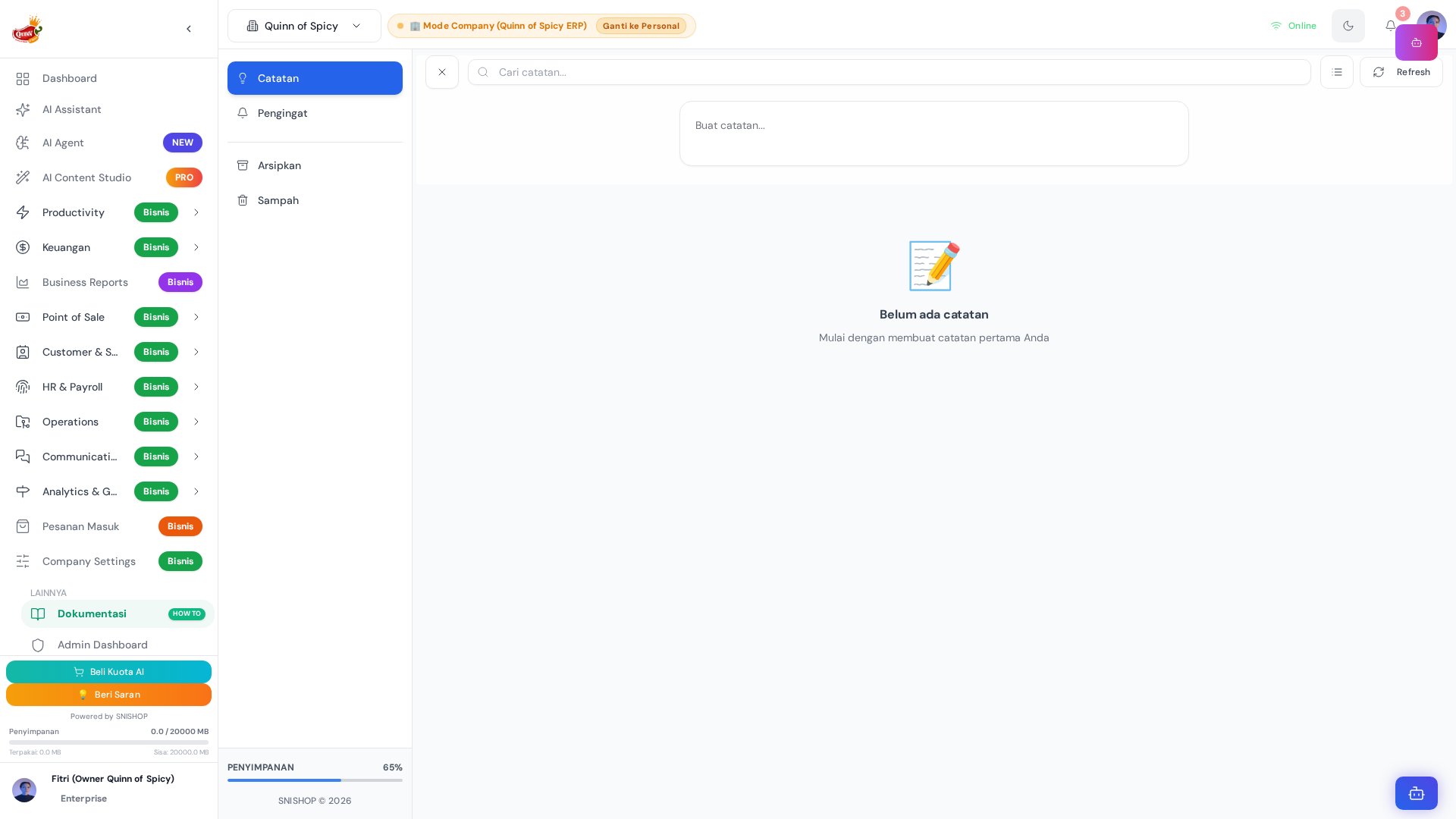 Halaman Notes menyediakan ruang untuk menulis catatan personal maupun kerja dengan editor rich-text **ReactQuill**. Dibangun di atas `Notes.jsx` (1088 baris) dengan arsitektur multi-layer realtime sync, integrasi AI assistant, dan export ke PDF/Word.
Sistem ini menggunakan 6 mekanisme sync berbeda untuk memastikan catatan selalu terupdate di semua tab dan device. Catatan diorganisir dengan label, bisa di-pin untuk akses cepat, dan diarsipkan jika sudah tidak aktif.
## Arsitektur Komponen
```mermaid theme={null}
graph TD
A[Notes.jsx
Halaman Notes menyediakan ruang untuk menulis catatan personal maupun kerja dengan editor rich-text **ReactQuill**. Dibangun di atas `Notes.jsx` (1088 baris) dengan arsitektur multi-layer realtime sync, integrasi AI assistant, dan export ke PDF/Word.
Sistem ini menggunakan 6 mekanisme sync berbeda untuk memastikan catatan selalu terupdate di semua tab dan device. Catatan diorganisir dengan label, bisa di-pin untuk akses cepat, dan diarsipkan jika sudah tidak aktif.
## Arsitektur Komponen
```mermaid theme={null}
graph TD
A[Notes.jsx
1088 lines] --> B[NoteSidebar
145 lines]
A --> C[NoteMasonryGrid
50 lines]
A --> D[NoteEditor
391 lines]
A --> E[NoteFloatingAI]
A --> F[NoteAIAssistant]
B --> G[Notes View]
B --> H[Reminders View]
B --> I[Archive View]
B --> J[Trash View]
B --> K[Label Filter]
B --> L[Storage Indicator]
C --> M[NoteItem]
D --> N[ReactQuill Editor]
D --> O[jsPDF + html2canvas
PDF Export]
D --> P[HTML Blob
Word Export]
D --> Q[CommentSection]
A --> R[base44.entities.Note]
```
## Ringkasan Fitur Utama
| Fitur | Deskripsi |
| - | - |
| **Rich Text Editor** | Editor ReactQuill dengan formatting lengkap (heading, list, code, image, tabel, dll.) |
| **Workspace Scoping** | Catatan terisolasi per workspace untuk organisasi yang rapi |
| **Label System** | Tag dinamis dengan warna dan ikon untuk kategorisasi fleksibel |
| **Pin & Archive** | Pin catatan penting di atas, arsipkan yang sudah tidak aktif |
| **Reminder** | Atur waktu pengingat agar tidak melewatkan catatan penting |
| **Hierarki Catatan** | Dukungan parent-child untuk catatan bersarang |
| **PDF/Word Export** | Export catatan ke format PDF atau Word untuk sharing dan backup |
| **AI Assistant** | Generate, ringkas, atau rewrite catatan dengan bantuan AI |
| **Komentar** | Diskusi pada catatan dengan mention dan threaded replies |
| **Realtime Sync** | 6 layer sinkronisasi lintas tab dan device |
| **Block Editor** | Konten catatan tersimpan sebagai block terstruktur (text, heading, todo, code, dll.) |
| **Template** | Simpan catatan sebagai template untuk digunakan ulang |
| **Public Sharing** | Bagikan catatan ke publik dengan toggle `is_public` |
| **Color Coding** | Atur warna background catatan untuk visualisasi cepat |
## Entity Relationship Diagram
```mermaid theme={null}
erDiagram
User ||--o{ Note : "membuat catatan"
User ||--o{ Comment : "menulis komentar"
User ||--o{ Label : "memiliki label"
User ||--o{ WorkspaceMember : "anggota workspace"
User ||--o{ Document : "mengunggah dokumen"
Workspace ||--o{ Note : "memiliki catatan"
Workspace ||--o{ Label : "memiliki label"
Workspace ||--o{ Comment : "memiliki komentar"
Workspace ||--o{ WorkspaceMember : "memiliki anggota"
Workspace ||--o{ Task : "memiliki tugas"
WorkspaceMember }o--|| Workspace : "tergabung di"
WorkspaceMember }o--|| User : "anggota"
Note ||--o{ Comment : "memiliki komentar"
Note ||--o{ Note : "parent-child hierarki"
Note }o--o{ Label : "diberi label"
Note }o--o| Workspace : "tercakup dalam"
Note }o--o| Company : "terkait perusahaan"
Comment }o--o| Comment : "reply threaded"
Comment }o--|| User : "ditulis oleh"
Task }o--o{ Label : "diberi label"
Task ||--o{ Comment : "memiliki komentar"
Document }o--o| Company : "terkait perusahaan"
User {
string email PK
string full_name
string role "admin | user"
number total_notes_created
number storage_used
}
Note {
string title "Judul catatan"
string content "Konten rich text"
string workspace_id FK
string company_id "ID perusahaan (null untuk personal)"
string parent_id "ID catatan parent untuk hierarki"
string icon "Icon catatan"
boolean is_template "Apakah catatan template"
boolean is_public "Apakah catatan dapat diakses publik"
array tags "Tag bebas"
array labels "ID label yang diterapkan"
string color "Warna background catatan"
boolean pinned "Apakah catatan di-pin"
boolean archived "Apakah catatan diarsipkan"
datetime reminder_time "Waktu pengingat"
array blocks "Block konten terstruktur"
}
Label {
string name "Nama label"
string color "Warna label (default #9CA3AF)"
string icon "Icon label (default 🏷️)"
string description "Penjelasan kegunaan label"
string user_id FK "ID pemilik label"
string workspace_id FK "ID workspace"
}
Comment {
string entity_type "task | note"
string entity_id FK
string workspace_id FK
string content "Isi komentar"
string user_id FK
string user_name "Nama pengguna"
string user_email "Email pengguna"
array mentions "User IDs yang di-mention"
string parent_comment_id "ID parent untuk replies"
datetime edited_at "Waktu terakhir diedit"
}
Workspace {
string name "Nama workspace"
string description "Deskripsi workspace"
string icon "Icon workspace"
string color "Warna tema workspace"
string owner_id FK "ID pemilik workspace"
string company_id "ID perusahaan"
boolean is_personal "Apakah workspace pribadi"
object settings "Pengaturan workspace"
}
WorkspaceMember {
string workspace_id FK
string user_id FK
string role "owner | admin | member | viewer"
string invited_by "Email pengundang"
datetime joined_at "Waktu bergabung"
string description "Catatan tambahan anggota"
object permissions "Hak akses granular"
}
Document {
string title "Judul dokumen"
string description "Deskripsi dokumen"
string category "contract | invoice | report | presentation | spreadsheet | other"
string file_url "URL file dokumen"
string file_type "pdf, docx, xlsx, dll."
number file_size "Ukuran file dalam bytes"
array tags "Tag dokumen"
array shared_with "Email pengguna yang bisa akses"
string folder "Nama folder"
number version "Versi dokumen"
boolean is_locked "Apakah dokumen dikunci"
date expiry_date "Tanggal kedaluwarsa"
}
```
## Entity Schema: Note
Entitas utama untuk menyimpan catatan dalam sistem SNISHOP ERP.
| Field | Tipe | Required | Default | Deskripsi |
| - | - | - | - | - |
| `title` | string | **Ya** | — | Judul catatan |
| `content` | string | Tidak | — | Konten catatan dalam format rich text (HTML) |
| `workspace_id` | string | **Ya** | — | ID workspace sebagai scope catatan |
| `company_id` | string | Tidak | null | ID perusahaan (null untuk catatan personal) |
| `parent_id` | string | Tidak | — | ID catatan parent untuk membuat hierarki catatan |
| `icon` | string | Tidak | — | Icon/emoji yang ditampilkan pada catatan |
| `is_template` | boolean | Tidak | `false` | Apakah catatan ini merupakan template yang bisa digunakan ulang |
| `is_public` | boolean | Tidak | `false` | Apakah catatan dapat diakses oleh publik (tanpa login) |
| `tags` | string\[] | Tidak | — | Array tag bebas untuk kategorisasi informal |
| `labels` | string\[] | Tidak | — | Array ID Label yang diterapkan pada catatan |
| `color` | string | Tidak | — | Warna background catatan untuk visualisasi cepat |
| `pinned` | boolean | Tidak | `false` | Apakah catatan di-pin (ditampilkan di atas daftar) |
| `archived` | boolean | Tidak | `false` | Apakah catatan diarsipkan (disembunyikan dari daftar aktif) |
| `reminder_time` | datetime | Tidak | — | Waktu pengingat (trigger notifikasi) |
| `blocks` | Block\[] | Tidak | — | Array block konten terstruktur (lihat schema block di bawah) |
### Block Schema (Nested Object)
Setiap catatan dapat menyimpan konten sebagai array block terstruktur:
| Field | Tipe | Deskripsi |
| - | - | - |
| `id` | string | Identifier unik untuk setiap block |
| `type` | enum | Tipe block (lihat tabel enum di bawah) |
| `content` | string | Isi konten block |
| `properties` | object | Properti tambahan spesifik per tipe block |
### Block Type Enum
| Nilai | Deskripsi |
| - | - |
| `text` | Block teks biasa |
| `heading` | Block heading (H1-H3) |
| `bullet` | Bullet list item |
| `number` | Numbered list item |
| `todo` | Checkbox / to-do item |
| `quote` | Block kutipan (blockquote) |
| `code` | Block kode (code snippet) |
| `divider` | Garis pemisah antar section |
| `image` | Block gambar (inline image) |
| `table` | Block tabel |
## Entity Schema: Label
Label adalah entitas terpisah yang merepresentasikan tag terstruktur dengan warna dan ikon.
| Field | Tipe | Required | Default | Deskripsi |
| - | - | - | - | - |
| `name` | string | **Ya** | — | Nama label (misalnya: "meeting", "ide", "urgent") |
| `color` | string | Tidak | `#9CA3AF` | Warna hex label untuk identifikasi visual |
| `icon` | string | Tidak | `🏷️` | Icon/emoji yang ditampilkan bersama label |
| `description` | string | Tidak | — | Penjelasan singkat tentang kegunaan label ini (maks. 1000 karakter) |
| `user_id` | string | **Ya** | — | ID pemilik label (label bersifat per-user atau per-workspace) |
| `workspace_id` | string | Tidak | — | ID workspace tempat label berlaku |
## Entity Schema: Comment
Komentar yang dapat ditempelkan pada catatan (atau task) untuk kolaborasi tim.
| Field | Tipe | Required | Default | Deskripsi |
| - | - | - | - | - |
| `entity_type` | enum | **Ya** | — | Jenis entitas yang dikomentari: `task` atau `note` |
| `entity_id` | string | **Ya** | — | ID dari task atau note yang dikomentari |
| `workspace_id` | string | Tidak | — | ID workspace tempat komentar berada |
| `content` | string | **Ya** | — | Isi teks komentar |
| `user_id` | string | **Ya** | — | ID pengguna yang menulis komentar |
| `user_name` | string | Tidak | — | Nama lengkap pengguna (denormalized untuk performa) |
| `user_email` | string | Tidak | — | Email pengguna (denormalized untuk performa) |
| `mentions` | string\[] | Tidak | — | Array user\_ids yang di-mention dalam komentar |
| `parent_comment_id` | string | Tidak | — | ID parent comment untuk threaded replies |
| `edited_at` | datetime | Tidak | — | Timestamp terakhir komentar diedit |
## Entity Schema: Document
Dokumen yang dapat dikaitkan dengan catatan atau digunakan secara independen.
| Field | Tipe | Required | Default | Deskripsi |
| - | - | - | - | - |
| `title` | string | **Ya** | — | Judul dokumen |
| `file_url` | string | **Ya** | — | URL file dokumen (storage path) |
| `company_id` | string | Tidak | null | ID perusahaan (null untuk dokumen personal) |
| `description` | string | Tidak | — | Deskripsi dokumen |
| `category` | enum | Tidak | `other` | Kategori dokumen (lihat enum di bawah) |
| `file_type` | string | Tidak | — | Tipe file: pdf, docx, xlsx, dll. |
| `file_size` | number | Tidak | — | Ukuran file dalam bytes |
| `tags` | string\[] | Tidak | — | Array tag untuk organisasi |
| `shared_with` | string\[] | Tidak | — | Array email pengguna yang bisa mengakses |
| `folder` | string | Tidak | — | Nama folder untuk pengelompokan |
| `version` | number | Tidak | `1` | Nomor versi dokumen (incremental) |
| `is_locked` | boolean | Tidak | `false` | Apakah dokumen dikunci (tidak bisa diedit) |
| `expiry_date` | date | Tidak | — | Tanggal kedaluwarsa dokumen |
### Document Category Enum
| Nilai | Deskripsi |
| - | - |
| `contract` | Dokumen kontrak atau perjanjian |
| `invoice` | Faktur atau tagihan |
| `report` | Laporan (keuangan, operasional, dll.) |
| `presentation` | Presentasi atau slide |
| `spreadsheet` | Spreadsheet atau tabel data |
| `other` | Kategori lainnya (default) |
## Entity Schema: Workspace
Workspace adalah unit organisasi yang mengelilingi catatan, task, dan label.
| Field | Tipe | Required | Default | Deskripsi |
| - | - | - | - | - |
| `name` | string | **Ya** | — | Nama workspace |
| `owner_id` | string | **Ya** | — | ID pemilik workspace |
| `company_id` | string | Tidak | null | ID perusahaan (null untuk personal workspace) |
| `description` | string | Tidak | — | Deskripsi workspace |
| `icon` | string | Tidak | — | Icon workspace |
| `color` | string | Tidak | `#2563eb` | Warna tema workspace |
| `is_personal` | boolean | Tidak | `false` | Apakah workspace pribadi (non-kolaboratif) |
| `settings` | object | Tidak | — | Pengaturan workspace (lihat di bawah) |
### Workspace Settings Object
| Field | Tipe | Default | Deskripsi |
| - | - | - | - |
| `allow_public_sharing` | boolean | `false` | Izinkan anggota membagikan catatan ke publik |
| `default_task_priority` | enum | `medium` | Prioritas default task baru (`low`, `medium`, `high`, `urgent`) |
## Entity Schema: WorkspaceMember
Keanggotaan workspace yang menentukan hak akses setiap pengguna.
| Field | Tipe | Required | Default | Deskripsi |
| - | - | - | - | - |
| `workspace_id` | string | **Ya** | — | ID workspace yang dimasuki |
| `user_id` | string | **Ya** | — | Email pengguna yang diundang |
| `role` | enum | Tidak | `member` | Peran dalam workspace (lihat enum di bawah) |
| `invited_by` | string | Tidak | — | Email pengguna yang mengundang |
| `joined_at` | datetime | Tidak | — | Waktu bergabung |
| `description` | string | Tidak | — | Catatan tambahan mengenai anggota (maks. 1000 karakter) |
| `permissions` | object | Tidak | — | Hak akses granular (lihat di bawah) |
### Workspace Member Role Enum
| Nilai | Deskripsi |
| - | - |
| `owner` | Pemilik workspace — full akses, bisa ada multiple owners |
| `admin` | Administrator — akses luas termasuk manajemen anggota |
| `member` | Anggota standar — bisa membuat dan mengedit konten |
| `viewer` | Hanya bisa melihat, tidak bisa mengedit |
### Workspace Member Permissions Object
| Field | Tipe | Default | Deskripsi |
| - | - | - | - |
| `can_create_tasks` | boolean | `true` | Boleh membuat task baru |
| `can_edit_tasks` | boolean | `true` | Boleh mengedit task yang ada |
| `can_delete_tasks` | boolean | `false` | Boleh menghapus task |
| `can_invite_members` | boolean | `false` | Boleh mengundang anggota baru |
| `can_access_all_tasks` | boolean | `false` | Akses ke semua task terlepas dari assignment |
## Entity Relationship Diagram (Ringkas)
```mermaid theme={null}
erDiagram
User ||--o{ Note : "create"
Note ||--o{ Note : "parent-child"
Note }o--|| Workspace : "scoped by"
Note }o--o{ Label : "tagged with"
Note ||--o{ Comment : "has"
Comment }o--|| User : "authored by"
Workspace ||--o{ WorkspaceMember : "has"
WorkspaceMember }o--|| User : "joins"
Workspace ||--o{ Label : "defines"
Label }o--|| User : "owned by"
```
## Siklus Hidup Catatan (Note Lifecycle)
```mermaid theme={null}
stateDiagram-v2
[*] --> Draft : User membuat catatan baru
Draft --> Active : Simpan & publish
Active --> Pinned : User pin catatan
Pinned --> Active : User unpin catatan
Active --> Archived : User arsipkan
Archived --> Active : User restore dari arsip
Active --> Trashed : User hapus (soft delete)
Pinned --> Trashed : User hapus (soft delete)
Archived --> Trashed : User hapus (soft delete)
Trashed --> Active : User restore dari trash
Trashed --> [*] : Hapus permanen (hard delete)
Active --> Shared : Toggle is_public = true
Shared --> Active : Toggle is_public = false
Active --> Template : Toggle is_template = true
Template --> Active : Toggle is_template = false
```
### Penjelasan State
| State | Deskripsi |
| - | - |
| **Draft** | Catatan baru dibuat, belum disimpan sepenuhnya |
| **Active** | Catatan aktif dan terlihat di daftar utama |
| **Pinned** | Catatan di-pin dan ditampilkan di atas daftar aktif |
| **Archived** | Catatan diarsipkan, tidak muncul di daftar aktif namun masih bisa dicari |
| **Trashed** | Catatan dihapus (soft delete), masih bisa di-restore dalam periode tertentu |
| **Shared** | Catatan ditandai sebagai publik dan bisa diakses tanpa login |
| **Template** | Catatan disimpan sebagai template untuk digunakan ulang |
## 4 View di Sidebar
| View | Deskripsi |
| - | - |
| **Notes** | Catatan aktif (default) — menampilkan semua catatan yang tidak diarsipkan dan tidak di-trash |
| **Reminders** | Catatan dengan reminder — filter catatan yang memiliki `reminder_time` |
| **Archive** | Catatan yang diarsipkan — catatan dengan `archived = true` |
| **Trash** | Catatan yang dihapus — soft-deleted notes yang masih bisa di-restore |
## Layout: Masonry Grid
NoteMasonryGrid menyediakan layout responsif dengan 4 breakpoint:
| Columns | Screen Width |
| - | - |
| 1 kolom | Mobile (\< 640px) |
| 2 kolom | Tablet (640-1024px) |
| 3 kolom | Desktop kecil (1024-1440px) |
| 4 kolom | Desktop besar (> 1440px) |
Toggle antara **grid view** dan **list view** tersedia di toolbar.
## ReactQuill Rich Text Editor
NoteEditor menggunakan ReactQuill dengan toolbar yang bisa dikustomisasi melalui `quillModules`:
| Fitur Editor | Deskripsi |
| - | - |
| **Formatting** | Bold, italic, underline, strikethrough |
| **Headings** | H1, H2, H3 |
| **Lists** | Ordered dan unordered |
| **Links** | Insert dan edit hyperlink |
| **Images** | Insert gambar inline |
| **Code** | Inline code dan code block |
| **Blockquote** | Kutipan |
| **Colors** | Text dan background color |
## Export Catatan
### PDF Export
Menggunakan `jsPDF` + `html2canvas`:
```mermaid theme={null}
sequenceDiagram
participant User
participant NoteEditor
participant html2canvas
participant jsPDF
User->>NoteEditor: Click Export PDF
NoteEditor->>html2canvas: Render note content
html2canvas-->>NoteEditor: Canvas image
NoteEditor->>jsPDF: Create PDF from canvas
jsPDF-->>User: Download PDF file
```
### Word Export
Menggunakan HTML blob download:
```mermaid theme={null}
sequenceDiagram
participant User
participant NoteEditor
participant Blob
User->>NoteEditor: Click Export Word
NoteEditor->>NoteEditor: Strip editor chrome
NoteEditor->>Blob: Create HTML blob
Blob-->>User: Download .doc file
```
## 6 Layer Realtime Sync
```mermaid theme={null}
flowchart TD
A[Note Changed] --> B[BroadcastChannel API]
A --> C[Global DOM Events]
A --> D[AI Events]
A --> E[Direct Reload]
A --> F[Force Reload]
A --> G[localStorage Events]
B --> H[All listeners notified]
C --> H
D --> H
E --> H
F --> H
G --> H
```
| Layer | Mekanisme | Scope |
| - | - | - |
| 1 | BroadcastChannel API | Tab-to-tab, browser sama |
| 2 | Global DOM events | In-page components |
| 3 | AI events | AI assistant interactions |
| 4 | Direct reload | Manual refresh |
| 5 | Force reload | Hard refresh override |
| 6 | localStorage events | Cross-tab fallback |
## Label System
Label adalah tag bebas yang bisa ditambahkan ke catatan. Dalam SNISHOP ERP, label direpresentasikan sebagai entitas terpisah (`Label`) yang memiliki nama, warna, dan ikon.
```mermaid theme={null}
graph LR
A[Note] --> B[label: meeting]
A --> C[label: ide]
A --> D[label: urgent]
E[NoteSidebar] --> F[Label Filter]
F --> B
F --> C
F --> D
```
### Alur Pembuatan Label
```mermaid theme={null}
sequenceDiagram
participant User
participant NoteEditor
participant LabelSystem
participant Database
User->>NoteEditor: Ketik nama label baru
NoteEditor->>LabelSystem: Cek keberadaan label
alt Label sudah ada
LabelSystem-->>NoteEditor: Return existing label ID
else Label belum ada
NoteEditor->>Database: Create new Label entity
Database-->>NoteEditor: Return new label ID
end
NoteEditor->>Database: Update Note.labels array
Database-->>User: Note terupdate dengan label
```
### Konvensi Label
* Label dibuat secara dinamis saat mengetik — tidak perlu pre-define
* Sidebar menampilkan semua label yang sudah ada dari entitas `Label`
* Klik label di sidebar untuk memfilter catatan dengan label tersebut
* Setiap label memiliki `color` (hex) dan `icon` (emoji) untuk identifikasi visual
* Label bersifat per-user dalam workspace — `user_id` dan `workspace_id` menentukan scope
* Hindari duplikasi dengan nama berbeda — konsistensi label meningkatkan efektivitas organisasi
### Contoh Label yang Direkomendasikan
| Label | Warna | Penggunaan |
| - | - | - |
| `meeting` | `#3B82F6` | Catatan hasil rapat |
| `ide` | `#F59E0B` | Brainstorming dan ide baru |
| `urgent` | `#EF4444` | Item yang perlu tindakan segera |
| `todo` | `#10B981` | Daftar tugas |
| `referensi` | `#8B5CF6` | Referensi dan sumber informasi |
| `draft` | `#6B7280` | Catatan yang masih dalam proses |
## Pinned Notes
Catatan yang di-pin ditampilkan terpisah di bagian atas:
```mermaid theme={null}
flowchart TD
A[All Notes] --> B{pinned?}
B -->|Ya| C[Pinned Section
di atas]
B -->|Tidak| D[Regular Notes
di bawah]
```
Catatan dengan `pinned = true` akan:
* Muncul di section terpisah paling atas pada masonry grid
* Mendapat indikator visual (ikon pin)
* Tetap muncul di hasil pencarian dan filter label
* Bisa di-unpin kapan saja untuk kembali ke urutan normal
## Search
Pencarian strip HTML tags dari content dan mencari di title + content:
```
searchQuery → stripHTML(content) → match title OR content
```
Proses pencarian:
1. User mengetik di search bar
2. Sistem melakukan strip HTML tags dari semua `content` catatan
3. Mencocokkan query terhadap `title` dan `content` (tanpa HTML)
4. Hasil ditampilkan di grid/list view sesuai mode aktif
5. Pencarian berlaku lintas semua view (aktif, archived) kecuali trash
## Storage Tracking
Sidebar menampilkan indikator penggunaan storage:
```mermaid theme={null}
flowchart LR
A[Create Note] --> B[Estimate size]
B --> C[Update storageUsed]
D[Delete Note] --> E[Reduce size]
E --> C
C --> F[Storage Indicator
in sidebar]
```
Storage tracking memperhitungkan:
* Ukuran konten HTML setiap catatan
* Gambar yang di-embed dalam catatan
* Block data yang tersimpan
* Field `storage_used` pada entitas `User` menyimpan total penggunaan
## Komentar pada Catatan
Sistem komentar memungkinkan kolaborasi tim langsung pada catatan melalui entitas `Comment`.
### Alur Komentar
```mermaid theme={null}
sequenceDiagram
participant User as Pengguna
participant UI as CommentSection
participant DB as Database
participant Notify as Notification System
User->>UI: Tulis komentar
UI->>UI: Parse @mentions
UI->>DB: Create Comment entity
Note over DB: entity_type = "note"
entity_id = note_id
DB-->>UI: Comment tersimpan
UI->>Notify: Kirim notifikasi
Notify->>Notify: Notifikasi ke mentioned users
Notify-->>User: Feedback ke pengguna
```
### Threaded Replies
Komentar mendukung reply bertingkat melalui field `parent_comment_id`:
```mermaid theme={null}
graph TD
A[Comment Root] --> B[Reply 1]
A --> C[Reply 2]
B --> D[Reply ke Reply 1]
C --> E[Reply ke Reply 2]
```
### Fitur Komentar
| Fitur | Deskripsi |
| - | - |
| **Mention** | Tag pengguna dengan `@email` — tersimpan di array `mentions` |
| **Threaded Reply** | Balas komentar tertentu melalui `parent_comment_id` |
| **Edit** | Edit komentar — timestamp tercatat di `edited_at` |
| **Denormalized User** | `user_name` dan `user_email` disimpan langsung untuk performa |
| **Polymorphic** | Komentar bisa untuk `note` atau `task` melalui `entity_type` |
## Hierarki Catatan (Parent-Child)
Catatan mendukung struktur hierarki melalui field `parent_id`:
```mermaid theme={null}
graph TD
A[Catatan Parent
parent_id = null] --> B[Child Note 1
parent_id = A.id]
A --> C[Child Note 2
parent_id = A.id]
B --> D[Grandchild Note
parent_id = B.id]
C --> E[Grandchild Note
parent_id = C.id]
```
Hierarki memungkinkan:
* Membuat sub-catatan dari catatan utama
* Organisasi catatan yang lebih terstruktur
* Navigasi parent-child melalui field `parent_id`
* Kedalaman hierarki tidak dibatasi (recursive)
## Template Catatan
Catatan bisa disimpan sebagai template untuk digunakan ulang:
| Field | Nilai |
| - | - |
| `is_template` | `true` |
| Penggunaan | Buat catatan baru berdasarkan template |
| Content | Tetap tersimpan sebagai rich text HTML |
| Blocks | Block structure juga ter-copy |
Template berguna untuk:
* Format meeting notes yang konsisten
* Checklist standar untuk proses berulang
* Format laporan berkala
## Integrasi AI
| Komponen | Fungsi |
| - | - |
| **NoteFloatingAI** | Floating button untuk akses AI dari halaman notes |
| **NoteAIAssistant** | Panel AI untuk generate, summarize, atau rewrite catatan |
### Alur AI Assistant
```mermaid theme={null}
sequenceDiagram
participant User
participant FloatingAI as NoteFloatingAI
participant Panel as NoteAIAssistant
participant API as AI API
participant DB as Database
User->>FloatingAI: Klik floating button
FloatingAI->>Panel: Buka panel AI
User->>Panel: Pilih aksi (generate/summarize/rewrite)
Panel->>API: Kirim request dengan konteks catatan
API-->>Panel: Return hasil AI
Panel->>UI: Tampilkan preview hasil
User->>Panel: Accept / Reject
alt Accept
Panel->>DB: Update Note content
DB-->>User: Catatan terupdate
else Reject
Panel->>Panel: Discard hasil
end
```
### Penggunaan AI Credits
Integrasi AI menggunakan `ai_credits` dari entitas `User`:
* Setiap operasi AI mengurangi `ai_monthly_usage`
* Kuota default: 10 credits per bulan (`ai_credits = 10`)
* Pengguna bisa menambah kuota melalui `ai_addon_quota`
* Period reset tercatat di `ai_usage_period_start`
## Filter & Pencarian
| Filter | Opsi |
| - | - |
| View | Notes, Reminders, Archive, Trash |
| Label | Dynamic — berdasarkan label yang ada di entitas `Label` |
| Search | Full-text search di title dan content |
| Layout | Grid (masonry) atau List |
| Pinned | Tampilkan hanya yang di-pin |
| Color | Filter berdasarkan warna catatan |
## RBAC Permission Matrix
Berdasarkan role di `WorkspaceMember`, berikut hak akses terhadap fitur Notes:
| Aksi | Owner | Admin | Member | Viewer |
| - | - | - | - | - |
| Buat catatan baru | ✅ | ✅ | ✅ | ❌ |
| Edit catatan sendiri | ✅ | ✅ | ✅ | ❌ |
| Edit catatan orang lain | ✅ | ✅ | ❌ | ❌ |
| Hapus catatan | ✅ | ✅ | ✅ | ❌ |
| Pin catatan | ✅ | ✅ | ✅ | ❌ |
| Arsipkan catatan | ✅ | ✅ | ✅ | ❌ |
| Export catatan | ✅ | ✅ | ✅ | ✅ |
| Lihat catatan publik | ✅ | ✅ | ✅ | ✅ |
| Kelola label | ✅ | ✅ | ✅ | ❌ |
| Komentar pada catatan | ✅ | ✅ | ✅ | ❌ |
| Hapus komentar orang lain | ✅ | ✅ | ❌ | ❌ |
| Share catatan ke publik | ✅ | ✅ | ⚙️ | ❌ |
| Kelola template | ✅ | ✅ | ✅ | ❌ |
| Unduh attachment | ✅ | ✅ | ✅ | ✅ |
> **Catatan:** ⚙️ = tergantung setting `allow_public_sharing` di workspace. Role `viewer` hanya bisa melihat, tidak bisa mengubah.
## Enum Reference
### Ringkasan Semua Enum dalam Sistem Notes
| Entity | Field | Nilai Enum | Default |
| - | - | - | - |
| `Note` | `blocks[].type` | `text`, `heading`, `bullet`, `number`, `todo`, `quote`, `code`, `divider`, `image`, `table` | — |
| `Comment` | `entity_type` | `task`, `note` | — |
| `Document` | `category` | `contract`, `invoice`, `report`, `presentation`, `spreadsheet`, `other` | `other` |
| `WorkspaceMember` | `role` | `owner`, `admin`, `member`, `viewer` | `member` |
| `Workspace` | `settings.default_task_priority` | `low`, `medium`, `high`, `urgent` | `medium` |
| `User` | `role` | `admin`, `user` | — |
| `User` | `subscription_plan` | `free`, `pro`, `business`, `advanced`, `enterprise` | `free` |
## Alur Penggunaan Lengkap
### Membuat Catatan Baru
```mermaid theme={null}
sequenceDiagram
participant User
participant Sidebar
participant Grid as NoteMasonryGrid
participant Editor as NoteEditor
participant DB as Database
participant Sync as Realtime Sync
User->>Sidebar: Klik "Catatan Baru"
Sidebar->>Editor: Buka editor ReactQuill
User->>Editor: Tulis judul dan konten
Editor->>Editor: Render sebagai HTML + Blocks
User->>Editor: Tambahkan labels
Editor->>DB: Create Note entity
DB-->>Editor: Return note_id
Editor->>Sync: Broadcast perubahan
Sync-->>Grid: Update tampilan
Grid-->>User: Catatan baru muncul di grid
```
### Berbagi Catatan ke Publik
```mermaid theme={null}
sequenceDiagram
participant User
participant Editor as NoteEditor
participant DB as Database
participant Public as Public Access
User->>Editor: Toggle is_public = true
Editor->>DB: Update Note.is_public
DB-->>Editor: Confirm update
Editor->>Editor: Generate public URL
Editor-->>User: Tampilkan link publik
Public->>DB: Akses catatan via public URL
DB-->>Public: Render catatan (read-only)
```
### Menandai Catatan dengan Label
```mermaid theme={null}
sequenceDiagram
participant User
participant Editor as NoteEditor
participant LabelSys as Label System
participant DB as Database
User->>Editor: Ketik nama label
Editor->>LabelSys: Cari label yang cocok
alt Label ditemukan
LabelSys-->>Editor: Return existing label
else Label baru
User->>Editor: Pilih warna & ikon
Editor->>DB: Create Label entity
DB-->>Editor: Return new label
end
Editor->>DB: Push label_id ke Note.labels[]
DB-->>User: Catatan terupdate dengan label
```
### Mengarsipkan dan Restore Catatan
```mermaid theme={null}
sequenceDiagram
participant User
participant UI as NoteItem
participant DB as Database
User->>UI: Klik "Arsipkan"
UI->>DB: Update Note.archived = true
DB-->>UI: Confirm
UI->>UI: Pindahkan ke Archive view
Note over User: ... beberapa waktu kemudian ...
User->>UI: Buka Archive view
User->>UI: Klik "Restore"
UI->>DB: Update Note.archived = false
DB-->>UI: Confirm
UI->>UI: Pindahkan kembali ke Notes view
```
## Cara Akses
Dari sidebar, klik menu **Productivity** > **Notes**.
## Flow Penggunaan
1. Buka halaman Notes dari sidebar — lihat catatan dalam masonry grid
2. Klik **"Catatan Baru"** untuk membuka editor ReactQuill
3. Tulis judul dan isi catatan dengan formatting yang dibutuhkan
4. Tambahkan labels untuk organisasi — ketik label baru atau pilih yang sudah ada
5. Pin catatan penting dengan klik ikon pin — muncul di atas daftar
6. Gunakan **search bar** untuk mencari catatan lama berdasarkan kata kunci
7. Export catatan ke PDF untuk sharing atau Word untuk editing lebih lanjut
8. Arsipkan catatan yang sudah tidak aktif — pindah ke Archive view
9. Gunakan **AI Assistant** untuk generate ide, ringkas catatan, atau rewrite
10. Tambahkan komentar untuk berdiskusi dengan tim — gunakan @mention untuk notifikasi
11. Buat hierarki catatan dengan parent-child untuk organisasi yang lebih terstruktur
12. Simpan catatan sebagai template untuk format yang sering digunakan ulang
## Tips
* Gunakan label yang konsisten — buat konvensi label untuk tim (misalnya: `meeting`, `ide`, `todo`)
* Pin hanya catatan yang benar-benar sering diakses — terlalu banyak pin mengurangi efektivitas
* Export ke PDF secara berkala sebagai backup di luar sistem
* Manfaatkan AI Assistant untuk brainstorming atau merapikan catatan meeting yang berantakan
* Review dan bersihkan catatan lama secara berkala — archive yang menumpuk sama dengan folder yang berantakan
* Gunakan hierarki parent-child untuk catatan yang memiliki sub-topik
* Manfaatkan warna label (`color`) untuk identifikasi visual cepat di masonry grid
* Simpan format catatan rutin sebagai template (`is_template = true`) untuk konsistensi
* Gunakan komentar dan @mention untuk kolaborasi — hindari membuat catatan terpisah untuk diskusi
* Atur `reminder_time` untuk catatan yang memiliki deadline atau tindak lanjut
* Pertimbangkan `is_public` dengan hati-hati — pastikan tidak ada informasi sensitif sebelum membagikan
* Monitor `storage_used` di profil user untuk mengontrol penggunaan storage
This documentation is built and hosted on [Mintlify](https://mintlify.com), a developer documentation platform.