> ## Documentation Index
> Fetch the complete documentation index at: https://docs.quinnsambal.com/llms.txt
> Use this file to discover all available pages before exploring further.
# Company POS Cashier
> Terminal kasir enterprise 6.191 baris — 60+ useState hooks, split payment, hold/recall, Bluetooth thermal printing, WhatsApp receipt, multi-location stock query, dan loyalty processing.
# Company POS Cashier
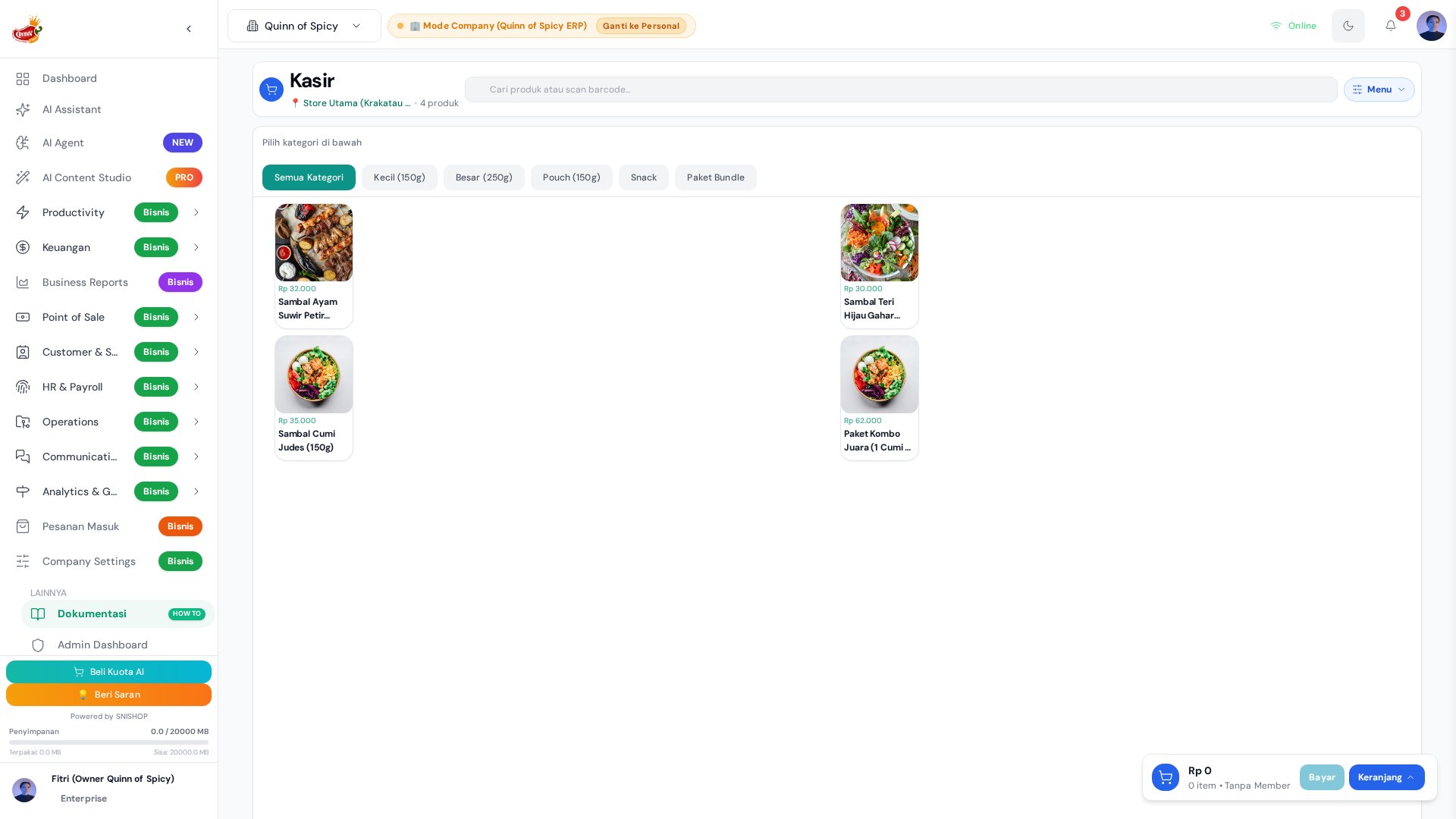 **Company POS Cashier** (`CompanyPOSCashier.jsx` — **6.191 baris**) adalah komponen terbesar di seluruh modul POS dan salah satu komponen terbesar di aplikasi SNISHOP ERP. Ini bukan sekadar halaman kasir — melainkan **terminal kasir enterprise** yang menggabungkan 60+ `useState` hooks, custom hooks modular, dan integrasi real-time dengan 7 modul lain dalam satu antarmuka yang dioptimalkan untuk kecepatan transaksi tinggi.
Komponen ini mendukung **multi-outlet** melalui outlet selector, **split payment** (multi-tender), **hold & recall transaksi**, **Bluetooth thermal printing**, **WhatsApp digital receipt**, **multi-location stock query**, dan **loyalty processing** (poin/stamps/discount tier).
## Arsitektur Komponen
```mermaid theme={null}
graph TB
subgraph "CompanyPOSCashier.jsx — 6.191 lines"
direction TB
HOOKS["60+ useState Hooks
**Company POS Cashier** (`CompanyPOSCashier.jsx` — **6.191 baris**) adalah komponen terbesar di seluruh modul POS dan salah satu komponen terbesar di aplikasi SNISHOP ERP. Ini bukan sekadar halaman kasir — melainkan **terminal kasir enterprise** yang menggabungkan 60+ `useState` hooks, custom hooks modular, dan integrasi real-time dengan 7 modul lain dalam satu antarmuka yang dioptimalkan untuk kecepatan transaksi tinggi.
Komponen ini mendukung **multi-outlet** melalui outlet selector, **split payment** (multi-tender), **hold & recall transaksi**, **Bluetooth thermal printing**, **WhatsApp digital receipt**, **multi-location stock query**, dan **loyalty processing** (poin/stamps/discount tier).
## Arsitektur Komponen
```mermaid theme={null}
graph TB
subgraph "CompanyPOSCashier.jsx — 6.191 lines"
direction TB
HOOKS["60+ useState Hooks
cart, payment, member, ui, sync"]
CUSTOM["Custom Hooks Layer"]
SYNC["Sync Layer
BroadcastChannel + WAL"]
end
subgraph "Custom Hooks"
H1[usePOSCart
326 lines]
H2[usePOSPayment
686 lines]
H3[usePOSDataLoader
376 lines]
H4[usePOSSync
170 lines]
end
subgraph "UI Sections"
U1[Product Grid
+ Category Filter]
U2[Cart Panel
+ Member Info]
U3[Payment Modal
+ Split Payment]
U4[Transaction History
Sidebar]
U5[Receipt Output
Print + WhatsApp]
end
subgraph "Server Functions — 14 calls"
S1[finalizeCompanyPOSCashierSale]
S2[approveCashierDiscount]
S3[manageCustomerLoyalty]
S4[transferInventoryLots]
S5[voidCompanyPOSTransaction]
end
HOOKS --> CUSTOM
CUSTOM --> H1 & H2 & H3 & H4
H1 --> U2
H2 --> U3
H3 --> U1
H4 --> SYNC
U3 --> S1 & S2 & S3 & S4
U4 --> S5
```
## Perbedaan dengan Kasir Personal
| Aspek | POS Kasir (Personal) | Company POS Cashier |
| - | - | - |
| **Komponen** | `POS.jsx` — 948 baris | `CompanyPOSCashier.jsx` — 6.191 baris |
| **Scope** | Satu outlet tetap | Semua outlet (selector) |
| **Harga** | Harga outlet tetap | Harga per outlet dari `channel_pricing{}` |
| **Stok** | Stok outlet tetap | Stok per outlet + multi-location query |
| **RLS** | Owner-scoped (`POSTransaction`) | Company-scoped (`CompanyPOSTransaction`) |
| **Split Payment** | Tidak | Ya — `payments[]` array |
| **Hold/Recall** | Tidak | Ya — `heldTransactions[]` |
| **Bluetooth Print** | Tidak | Ya — thermal printer BLE |
| **WhatsApp Receipt** | Tidak | Ya — via WhatsApp gateway |
| **Loyalty** | Basic poin | Full tier + poin + stamps + scheme |
| **Use Case** | Kasir harian single-outlet | Multi-outlet, enterprise, manajer |
## 60+ useState Hooks — Kategori
```mermaid theme={null}
graph LR
subgraph "Cart & Products — 12 hooks"
C1[cart / setCart]
C2[selectedCategory]
C3[searchQuery]
C4[productGrid]
C5[cartNotes]
end
subgraph "Payment — 10 hooks"
P1[payments / setPayments]
P2[selectedPaymentMethod]
P3[cashReceived]
P4[changeAmount]
P5[splitPaymentMode]
end
subgraph "Member & Loyalty — 8 hooks"
M1[selectedMember]
M2[memberSearch]
M3[loyaltyTier]
M4[availablePoints]
M5[stampsCount]
end
subgraph "UI State — 15 hooks"
U1[showPaymentModal]
U2[showHoldModal]
U3[showReceiptModal]
U4[activeTab]
U5[loading / processing]
end
subgraph "Sync & Data — 10 hooks"
S1[heldTransactions]
S2[recentTransactions]
S3[outletData]
S4[lastSyncTime]
S5[isOnline]
end
```
## Fitur Utama
| Fitur | Deskripsi | Implementasi |
| - | - | - |
| **Outlet Selector** | Pilih outlet target transaksi | Dropdown → filter harga & stok per outlet |
| **Product Search** | Cari berdasarkan nama, SKU, atau barcode | `searchQuery` state + debounced filter |
| **Cart Otomatis** | Kalkulasi subtotal, pajak, diskon, total | `usePOSCart` — 326 baris |
| **Split Payment** | Kombinasi beberapa metode pembayaran | `usePOSPayment` — 686 baris, `payments[]` array |
| **Hold/Recall** | Simpan transaksi sementara, panggil kembali | `heldTransactions[]` di localStorage |
| **Bluetooth Print** | Cetak struk ke thermal printer via BLE | Web Bluetooth API + ESC/POS commands |
| **WhatsApp Receipt** | Kirim struk digital ke WhatsApp pelanggan | WhatsApp gateway integration |
| **Multi-Location Stock** | Query stok dari lokasi lain jika out of stock | `transferInventoryLots` server function |
| **Loyalty Processing** | Poin, stamps, tier discount auto-apply | `manageCustomerLoyalty` server function |
| **Transaction History** | Riwayat transaksi di sidebar | `recentTransactions[]` + BroadcastChannel sync |
| **Discount Approval** | Diskon >20% butuh supervisor PIN | `approveCashierDiscount` server function |
| **Quick Cash Buttons** | Tombol nominal cepat (50rb, 100rb, 150rb) | UI shortcut untuk cash payment |
## Split Payment — Deep Dive
```mermaid theme={null}
sequenceDiagram
participant K as Kasir
participant UI as Payment Modal
participant CALC as usePOSPayment (686 lines)
participant SRV as Server
K->>UI: Total Rp 150.000
K->>UI: Enable split payment
K->>UI: Add Cash Rp 100.000
CALC->>CALC: remainingAmount = 150000 - 100000 = 50000
CALC-->>UI: Show remaining: Rp 50.000
K->>UI: Add QRIS Rp 50.000
CALC->>CALC: remainingAmount = 0
CALC-->>UI: Show "Lunas" ✅
K->>UI: Klik Bayar
UI->>SRV: finalizeCompanyPOSCashierSale({
payments: [{method:'cash',amount:100000},
{method:'qris',amount:50000}]})
SRV-->>UI: Transaction saved
```
| Step | Hook State | Deskripsi |
| - | - | - |
| 1 | `splitPaymentMode = true` | Aktifkan mode split payment |
| 2 | `payments = [{method:'cash', amount:100000}]` | Tambah tender pertama |
| 3 | `remainingAmount = total - sum(payments)` | Hitung sisa |
| 4 | `payments.push({method:'qris', amount:50000})` | Tambah tender kedua |
| 5 | `remainingAmount === 0` | Validasi: semua tender teralokasi |
| 6 | Submit ke server | Server validasi & simpan masing-masing tender |
## Hold & Recall Transaction
```mermaid theme={null}
stateDiagram-v2
[*] --> Active: Kasir mulai transaksi
Active --> Held: Tekan F4 / Ctrl+H
Held --> Active: Recall dari sidebar
Held --> Held: Multiple holds stacked
Active --> Completed: Bayar & finalize
Completed --> [*]
state Held {
[*] --> StoredInLocalStorage
StoredInLocalStorage --> VisibleInSidebar
VisibleInSidebar --> [*]
}
```
| Properti | Deskripsi |
| - | - |
| **Storage** | `heldTransactions[]` di localStorage |
| **Max Holds** | Tidak terbatas (selama localStorage cukup) |
| **Data** | Full cart snapshot + timestamp + notes |
| **Recall** | Klik di sidebar → restore cart ke active state |
| **Expiry** | Tidak ada auto-expiry (manual delete) |
| **Cross-Tab** | Sync via `BroadcastChannel('snishop_pos_updates')` |
## Multi-Location Stock Query
```mermaid theme={null}
flowchart TD
A[Kasir scan produk] --> B{Stok di outlet saat ini?}
B -->|Ya| C[Tambahkan ke cart]
B -->|Tidak| D[Auto-query lokasi lain]
D --> E{Ada di lokasi lain?}
E -->|Ya| F[Tampilkan: "Tersedia di Gudang Utama (15 pcs)"]
E -->|Tidak| G[Tampilkan: "Stok habis di semua lokasi"]
F --> H{Kasir pilih transfer?}
H -->|Ya| I[Execute transferInventoryLots]
I --> J[Stok pindah → tambah ke cart]
H -->|Tidak| K[Skip]
```
## Bluetooth Thermal Printing
| Parameter | Nilai |
| - | - |
| **Protocol** | Web Bluetooth API (BLE 4.0+) |
| **Command Set** | ESC/POS |
| **Paper Width** | 58mm / 80mm (auto-detect) |
| **Content** | Logo + nama toko + alamat + item list + total + barcode |
| **Fallback** | `window.print()` dengan CSS `@media print` |
| **Connection** | Pair sekali, auto-reconnect pada print berikutnya |
## WhatsApp Digital Receipt
```mermaid theme={null}
sequenceDiagram
participant K as Kasir
participant C as CompanyPOSCashier
participant WA as WhatsApp Gateway
participant P as Pelanggan
K->>C: Transaksi selesai
K->>C: Klik "Kirim via WhatsApp"
C->>C: Format receipt message
C->>WA: POST /api/whatsapp/send
WA->>P: Message: struk digital
P-->>WA: Read receipt
WA-->>C: Status: delivered
```
Format pesan WhatsApp receipt:
```
━━━━━━━━━━━━━━━━
🧾 QUINN OF SPICY
━━━━━━━━━━━━━━━━
No: INV-20260110-0042
Tgl: 10 Jan 2026, 14:30
Kasir: Ahmad
━━━━━━━━━━━━━━━━
1x Ayam Geprek 25.000
2x Es Teh 10.000
1x Nasi Putih 5.000
━━━━━━━━━━━━━━━━
Subtotal: 40.000
Pajak (10%): 4.000
━━━━━━━━━━━━━━━━
TOTAL: 44.000
Pembayaran:
Cash: 50.000
Kembalian: 6.000
━━━━━━━━━━━━━━━━
Terima kasih! 🌶️
```
## Transaction Integrity
| Mekanisme | Deskripsi | Implementasi |
| - | - | - |
| **Module Lock** | Cegah double-submit | `isTransactionInProgress` flag |
| **Safety Timeout** | Auto-release lock jika stuck | 60 detik timeout |
| **WAL** | Crash recovery | `TransactionQueue.js` — 241 baris |
| **Idempotency Key** | Cegah duplikasi transaksi | UUID per transaksi |
| **Optimistic UI** | Update UI sebelum server confirm | Rollback on error |
| **Stock Validation** | Cek stok real-time sebelum submit | Server-side validation |
## Cara Akses
| Metode | Detail |
| - | - |
| **URL** | `/companyposcashier` |
| **Sidebar** | Menu **POS** → **Company POS Cashier** |
| **Keyboard** | `Ctrl+Shift+C` |
## Flow Penggunaan
```mermaid theme={null}
sequenceDiagram
participant K as Kasir
participant S as Outlet Selector
participant P as Product Grid
participant C as Cart
participant PAY as Payment
participant R as Receipt
K->>S: Pilih outlet tujuan
K->>P: Cari/scan produk
P->>C: Tambahkan ke keranjang
K->>C: Input nomor member
C->>C: Auto-apply tier discount + poin
K->>C: Adjust qty, tambah catatan
K->>PAY: Klik Bayar
PAY->>K: Pilih metode (split ok)
K->>PAY: Selesaikan pembayaran
PAY->>PAY: Execute WAL → Server → Commit
PAY-->>K: Cetak/kirim receipt
PAY->>C: Clear cart, ready for next
```
## Tips
* **Masukkan nomor member sebelum bayar** agar poin dan diskon otomatis diterapkan
* **Gunakan shortcut keyboard** (F1 search, F3 bayar, F4 hold) untuk mempercepat transaksi
* **Cek outlet yang dipilih** sebelum memproses — stok dan harga bisa berbeda antar outlet
* **Manfaatkan hold/recall** jika pelanggan belum memutuskan — simpan cart, lanjut transaksi berikutnya
* **Gunakan multi-location stock** jika produk habis di outlet saat ini — sistem bisa auto-transfer
* **Test Bluetooth printer** di awal shift untuk memastikan koneksi stabil
This documentation is built and hosted on [Mintlify](https://mintlify.com), a developer documentation platform.