> ## Documentation Index
> Fetch the complete documentation index at: https://docs.quinnsambal.com/llms.txt
> Use this file to discover all available pages before exploring further.
# Whatsapp web
***
title: "WhatsApp Web"
description: "Integrasi WhatsApp dengan Fonnte gateway, AI copilot, intent detection, grounded reply, QR pairing, dan CRM integration di SNISHOP ERP."
------------------------------------------------------------------------------------------------------------------------------------------------------
# WhatsApp Web
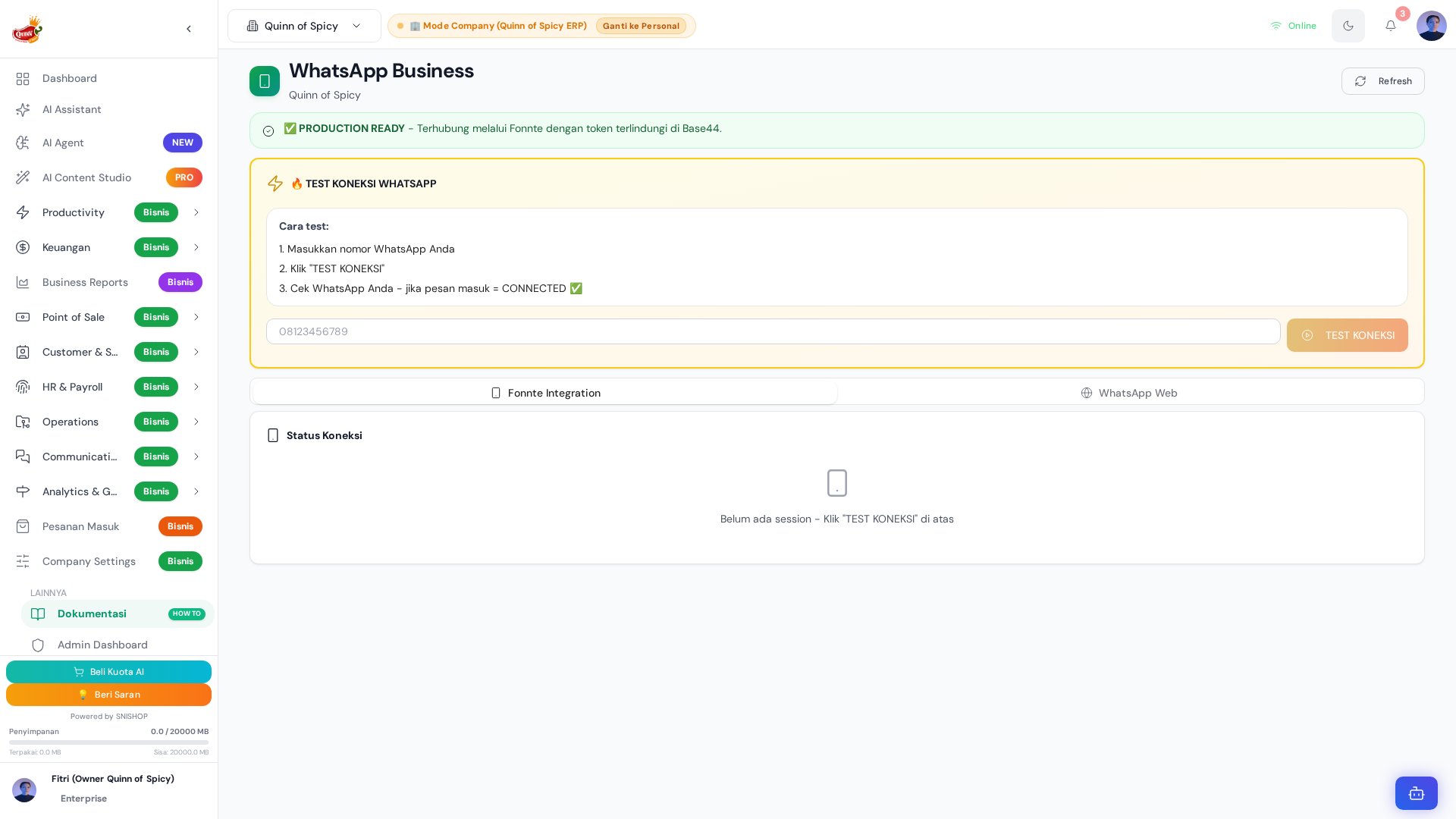 Modul **WhatsApp Web** merupakan sistem komunikasi WhatsApp terintegrasi paling canggih dalam QUINNOFSPICY ERP. Modul ini menggabungkan kemampuan *messaging* real-time, kecerdasan buatan (AI copilot), manajemen kontak, broadcast messaging, serta integrasi penuh dengan CRM dan modul keuangan — semuanya dalam satu antarmuka yang familiar seperti WhatsApp Web asli.
## Ringkasan Fitur Utama
| Kategori | Fitur | Keterangan |
| - | - | - |
| **Konektivitas** | QR Pairing & Pairing Code | Hubungkan nomor WhatsApp via scan QR atau kode 8-digit melalui Fonnte/Wablas gateway |
| **Chat Studio** | Dual-column interface | Antarmuka chat seperti WhatsApp Web asli dengan daftar kontak dan area percakapan |
| **AI Copilot** | Intent detection & grounded reply | Deteksi 9 intent customer dan hasilkan balasan berbasis data produk real-time |
| **Broadcast** | Mass messaging | Kirim pesan broadcast ke banyak kontak sekaligus via Fonnte Integration tab |
| **CRM Integration** | WhatsAppQuickSend | Kirim WhatsApp langsung dari halaman detail customer di CRM |
| **Finance Bot** | WhatsAppFinanceBot | Bot pencatatan keuangan via WhatsApp (mode personal & bisnis) |
| **Auto Receipt** | Struk otomatis via Wablas | Kirim struk transaksi otomatis ke customer setelah pembayaran |
| **Handoff** | AI-to-human escalation | Eskalasi otomatis ke CS manusia untuk intent sensitif (komplain, minta CS) |
## Komponen Penyusun
Modul ini terdiri dari lima komponen utama:
1. **WhatsAppWeb.jsx** (598 baris) — Halaman utama dengan 2 tab: *Fonnte Integration* dan *WhatsApp Web*
2. **InAppWhatsAppWeb.jsx** (822 baris) — Chat studio dual-column seperti WhatsApp Web asli, dengan AI copilot
3. **WAPairingModal.jsx** (428 baris) — Modal pairing QR code dan kode 8-digit
4. **WAChatAIEngine.js** (423 baris) — AI engine dengan intent detection dan grounded reply generation
5. **whatsappGatewayService.js** (82 baris) — Gateway service ke Fonnte API
Sistem ini menggunakan **Fonnte API** sebagai gateway WhatsApp (credentials disimpan aman di Base44 Application Secrets, tidak pernah di browser), dilengkapi AI copilot yang bisa mendeteksi intent customer dan menghasilkan balasan berbasis data produk real-time.
## Arsitektur Lengkap
```mermaid theme={null}
graph TD
A[WhatsAppWeb.jsx
Modul **WhatsApp Web** merupakan sistem komunikasi WhatsApp terintegrasi paling canggih dalam QUINNOFSPICY ERP. Modul ini menggabungkan kemampuan *messaging* real-time, kecerdasan buatan (AI copilot), manajemen kontak, broadcast messaging, serta integrasi penuh dengan CRM dan modul keuangan — semuanya dalam satu antarmuka yang familiar seperti WhatsApp Web asli.
## Ringkasan Fitur Utama
| Kategori | Fitur | Keterangan |
| - | - | - |
| **Konektivitas** | QR Pairing & Pairing Code | Hubungkan nomor WhatsApp via scan QR atau kode 8-digit melalui Fonnte/Wablas gateway |
| **Chat Studio** | Dual-column interface | Antarmuka chat seperti WhatsApp Web asli dengan daftar kontak dan area percakapan |
| **AI Copilot** | Intent detection & grounded reply | Deteksi 9 intent customer dan hasilkan balasan berbasis data produk real-time |
| **Broadcast** | Mass messaging | Kirim pesan broadcast ke banyak kontak sekaligus via Fonnte Integration tab |
| **CRM Integration** | WhatsAppQuickSend | Kirim WhatsApp langsung dari halaman detail customer di CRM |
| **Finance Bot** | WhatsAppFinanceBot | Bot pencatatan keuangan via WhatsApp (mode personal & bisnis) |
| **Auto Receipt** | Struk otomatis via Wablas | Kirim struk transaksi otomatis ke customer setelah pembayaran |
| **Handoff** | AI-to-human escalation | Eskalasi otomatis ke CS manusia untuk intent sensitif (komplain, minta CS) |
## Komponen Penyusun
Modul ini terdiri dari lima komponen utama:
1. **WhatsAppWeb.jsx** (598 baris) — Halaman utama dengan 2 tab: *Fonnte Integration* dan *WhatsApp Web*
2. **InAppWhatsAppWeb.jsx** (822 baris) — Chat studio dual-column seperti WhatsApp Web asli, dengan AI copilot
3. **WAPairingModal.jsx** (428 baris) — Modal pairing QR code dan kode 8-digit
4. **WAChatAIEngine.js** (423 baris) — AI engine dengan intent detection dan grounded reply generation
5. **whatsappGatewayService.js** (82 baris) — Gateway service ke Fonnte API
Sistem ini menggunakan **Fonnte API** sebagai gateway WhatsApp (credentials disimpan aman di Base44 Application Secrets, tidak pernah di browser), dilengkapi AI copilot yang bisa mendeteksi intent customer dan menghasilkan balasan berbasis data produk real-time.
## Arsitektur Lengkap
```mermaid theme={null}
graph TD
A[WhatsAppWeb.jsx
598 lines] --> B[ERPAccessGuard]
A --> C[Tab: Fonnte Integration]
A --> D[Tab: WhatsApp Web]
C --> E[Connection Status]
C --> F[Contact Export]
C --> G[Broadcast Messaging]
D --> H[InAppWhatsAppWeb
822 lines]
H --> I[Contact List
dual-column]
H --> J[Conversation View]
H --> K[AI Copilot Bar]
K --> L[WAChatAIEngine
423 lines]
L --> M[Intent Detection
9 intents]
L --> N[Product Matching]
L --> O[Grounded Reply
InvokeLLM]
H --> P[WAPairingModal
428 lines]
P --> Q[QR Scan Tab]
P --> R[Pairing Code Tab]
A --> S[whatsappGatewayService
82 lines]
S --> T[Fonnte API
via Base44 Functions]
H --> U[WhatsAppChatLog Entity]
H --> V[Demo Data Fallback]
A --> W[WhatsAppSession Entity]
A --> X[WhatsAppContact Entity]
A --> Y[WhatsAppFinanceBot Entity]
A --> Z[CompanyWablasSettings Entity]
```
### Alur Data End-to-End
```mermaid theme={null}
graph LR
subgraph "Frontend"
A[WhatsAppWeb.jsx]
B[InAppWhatsAppWeb.jsx]
C[WAPairingModal.jsx]
D[WAChatAIEngine.js]
end
subgraph "Service Layer"
E[whatsappGatewayService.js]
F[brandKnowledgeService]
end
subgraph "Base44 Backend"
G[whatsappConnect Function]
H[whatsappSendMessage Function]
I[InvokeLLM Function]
end
subgraph "Database"
J[(WhatsAppSession)]
K[(WhatsAppChatLog)]
L[(WhatsAppContact)]
M[(WhatsAppFinanceBot)]
N[(CompanyWablasSettings)]
O[(Customer)]
end
subgraph "External"
P[Fonnte API]
Q[Wablas API]
end
A --> E
B --> D
B --> E
C --> E
D --> F
D --> I
E --> G
E --> H
G --> P
H --> P
J --> A
K --> B
L --> B
M --> A
N --> A
O --> B
```
## Entity Relationship Diagram
```mermaid theme={null}
erDiagram
User ||--o{ WhatsAppSession : "memiliki"
User ||--o{ WhatsAppFinanceBot : "mendaftarkan"
User ||--o{ WhatsAppContact : "menyimpan"
Company ||--o{ WhatsAppSession : "memiliki sesi"
Company ||--o{ WhatsAppContact : "memiliki kontak"
Company ||--o{ WhatsAppChatLog : "memiliki log"
Company ||--o{ WhatsAppFinanceBot : "mode bisnis"
Company ||--o{ CompanyWablasSettings : "konfigurasi"
Company ||--o{ Customer : "melayani"
WhatsAppSession ||--o{ WhatsAppContact : "sinkronisasi"
WhatsAppSession ||--o{ WhatsAppChatLog : "mencatat"
WhatsAppContact }o--|| Customer : "berelasi dengan"
WhatsAppChatLog }o--|| Customer : "dari pelanggan"
WhatsAppFinanceBot }o--|| WhatsAppSession : "terhubung via"
Customer ||--o{ WhatsAppChatLog : "melakukan chat"
User {
string id PK
string email
string full_name
string role "admin | user"
}
Company {
string id PK
string name
}
WhatsAppSession {
string session_id PK
string user_id FK
string user_email
string company_id FK
string phone_number
string status "disconnected | connecting | connected | error"
string qr_code
datetime last_connected
number total_contacts
number total_messages_sent
object session_data "encrypted"
string description
}
WhatsAppContact {
string id PK
string session_id FK
string user_id FK
string company_id FK
string contact_name
string phone_number
boolean is_business
string profile_pic_url
string about
datetime last_synced
}
WhatsAppChatLog {
string id PK
string company_id FK
string phone_number
string customer_name
string direction "incoming | outgoing"
string message_body
string intent "9 klasifikasi"
number confidence
number qualification_score
boolean is_auto_reply
boolean is_handoff
string status "auto_replied | waiting_human | human_handled | failed"
string timestamp
}
WhatsAppFinanceBot {
string id PK
string user_id FK
string user_email
string user_name
string whatsapp_number
string company_id FK
string default_mode "personal | business"
string default_account_id
boolean is_active
boolean is_verified
datetime verified_at
datetime last_message_at
number total_transactions
number daily_chat_count
string last_chat_date
string bot_phone_number
string description
}
CompanyWablasSettings {
string id PK
string company_id FK
boolean use_system_api
string wablas_api_key
string wablas_secret_key
string wablas_domain
boolean is_active
boolean auto_send_receipt
string receipt_message_template
string description
}
Customer {
string id PK
string company_id FK
string name
string phone
string whatsapp_number
string email
string status "lead | prospect | customer | inactive"
date last_contact_date
string last_contact_method "phone | whatsapp | email | meeting"
string last_contact_notes
number lifetime_value
number total_orders
}
```
***
## Entity Schema Reference
### WhatsAppSession
Entity ini menyimpan informasi sesi koneksi WhatsApp yang terhubung melalui gateway. Setiap sesi mewakili satu nomor WhatsApp yang telah di-pairing.
| Field | Tipe | Required | Deskripsi |
| - | - | - | - |
| `user_id` | string | **Ya** | ID user pemilik session |
| `user_email` | string | **Ya** | Email user yang melakukan pairing |
| `company_id` | string | Tidak | ID company (null untuk personal) |
| `session_id` | string | Tidak | Unique session identifier |
| `phone_number` | string | Tidak | Nomor WhatsApp yang terkoneksi |
| `description` | string | Tidak | Catatan mengenai sesi WhatsApp ini dan tujuan penggunaannya (maks. 1000 karakter) |
| `status` | enum | Tidak | Status koneksi: `disconnected`, `connecting`, `connected`, `error` (default: `disconnected`) |
| `qr_code` | string | Tidak | QR Code untuk scan (base64 atau URL) |
| `last_connected` | datetime | Tidak | Terakhir kali terhubung |
| `total_contacts` | number | Tidak | Jumlah kontak tersinkronisasi (default: 0) |
| `total_messages_sent` | number | Tidak | Total pesan terkirim melalui sesi ini (default: 0) |
| `session_data` | object | Tidak | Data session WhatsApp (tersimpan terenkripsi) |
### WhatsAppChatLog
Entity ini mencatat setiap pesan WhatsApp yang masuk dan keluar, lengkap dengan hasil analisis AI termasuk intent detection dan qualification scoring.
| Field | Tipe | Required | Deskripsi |
| - | - | - | - |
| `phone_number` | string | **Ya** | Nomor telepon WhatsApp pelanggan |
| `customer_name` | string | Tidak | Nama pelanggan |
| `direction` | enum | Tidak | Arah pesan: `incoming` atau `outgoing` (default: `incoming`) |
| `message_body` | string | **Ya** | Isi pesan WhatsApp |
| `intent` | enum | Tidak | Klasifikasi intent dari AI: `greeting`, `product_inquiry`, `order_status`, `complaint`, `pricing`, `location`, `hours`, `human_request`, `out_of_scope` |
| `confidence` | number | Tidak | Tingkat keyakinan AI (0-1 atau 0-100) |
| `qualification_score` | number | Tidak | Skor kualifikasi prospek/pelanggan |
| `is_auto_reply` | boolean | Tidak | Apakah pesan dijawab otomatis oleh AI (default: `false`) |
| `is_handoff` | boolean | Tidak | Apakah pesan dialihkan ke CS manusia (default: `false`) |
| `status` | enum | Tidak | Status penanganan pesan: `auto_replied`, `waiting_human`, `human_handled`, `failed` (default: `auto_replied`) |
| `company_id` | string | Tidak | ID perusahaan |
| `timestamp` | string | Tidak | Waktu stempel transaksi pesan |
### WhatsAppContact
Entity ini menyimpan data kontak WhatsApp yang tersinkronisasi dari sesi yang terhubung, termasuk informasi profil dan foto.
| Field | Tipe | Required | Deskripsi |
| - | - | - | - |
| `session_id` | string | **Ya** | ID session WhatsApp yang menjadi sumber sinkronisasi |
| `user_id` | string | **Ya** | ID user pemilik kontak |
| `company_id` | string | Tidak | ID company (null untuk personal) |
| `contact_name` | string | Tidak | Nama kontak |
| `phone_number` | string | **Ya** | Nomor WhatsApp kontak |
| `is_business` | boolean | Tidak | Apakah akun ini merupakan akun bisnis (default: `false`) |
| `profile_pic_url` | string | Tidak | URL foto profil kontak |
| `about` | string | Tidak | Status/about kontak |
| `last_synced` | datetime | Tidak | Terakhir kali data kontak disinkronisasi |
### WhatsAppFinanceBot
Entity ini mengelola konfigurasi bot pencatatan keuangan melalui WhatsApp. Mendukung mode personal dan bisnis dengan pembatasan chat harian.
| Field | Tipe | Required | Deskripsi |
| - | - | - | - |
| `user_id` | string | **Ya** | ID user pemilik (email) |
| `user_email` | string | **Ya** | Email user |
| `whatsapp_number` | string | **Ya** | Nomor WhatsApp user (format: `628xxx`) |
| `user_name` | string | Tidak | Nama user |
| `company_id` | string | Tidak | ID perusahaan aktif untuk mode bisnis (null = personal) |
| `default_mode` | enum | Tidak | Mode default pencatatan: `personal` atau `business` (default: `personal`) |
| `default_account_id` | string | Tidak | ID rekening/akun default untuk pencatatan |
| `is_active` | boolean | Tidak | Status keaktifan bot (default: `true`) |
| `is_verified` | boolean | Tidak | Status verifikasi nomor (default: `false`) |
| `verified_at` | datetime | Tidak | Waktu verifikasi |
| `last_message_at` | datetime | Tidak | Waktu pesan terakhir diterima |
| `total_transactions` | number | Tidak | Total transaksi yang tercatat (default: 0) |
| `daily_chat_count` | number | Tidak | Jumlah chat hari ini, direset setiap hari (default: 0) |
| `last_chat_date` | string | Tidak | Tanggal terakhir chat (YYYY-MM-DD) untuk reset harian |
| `bot_phone_number` | string | Tidak | Nomor telepon bot |
| `description` | string | Tidak | Deskripsi konfigurasi bot (maks. 1000 karakter) |
### CompanyWablasSettings
Entity ini menyimpan konfigurasi integrasi Wablas WhatsApp per perusahaan, termasuk pengaturan pengiriman struk otomatis.
| Field | Tipe | Required | Deskripsi |
| - | - | - | - |
| `company_id` | string | **Ya** | ID perusahaan |
| `description` | string | Tidak | Catatan mengenai konfigurasi integrasi Wablas (maks. 1000 karakter) |
| `use_system_api` | boolean | Tidak | Gunakan API Wablas default sistem atau API sendiri (default: `true`) |
| `wablas_api_key` | string | Tidak | Wablas API Key sendiri (jika `use_system_api = false`) |
| `wablas_secret_key` | string | Tidak | Wablas Secret Key sendiri |
| `wablas_domain` | string | Tidak | Domain Wablas server (default: `solo.wablas.com`) |
| `is_active` | boolean | Tidak | Status keaktifan integrasi (default: `true`) |
| `auto_send_receipt` | boolean | Tidak | Otomatis kirim struk ke customer setelah transaksi (default: `false`) |
| `receipt_message_template` | string | Tidak | Template pesan struk WhatsApp, mendukung variabel: `{company_name}`, `{transaction_id}`, `{date}`, `{total}` |
***
## Enum Reference Tables
### WhatsAppSession.status — Status Koneksi Session
| Nilai | Deskripsi |
| - | - |
| `disconnected` | Session belum terhubung atau telah diputuskan |
| `connecting` | Proses pairing sedang berlangsung |
| `connected` | Session aktif dan siap mengirim/menerima pesan |
| `error` | Terjadi kesalahan pada koneksi (perlu reconnect) |
### WhatsAppChatLog.direction — Arah Pesan
| Nilai | Deskripsi |
| - | - |
| `incoming` | Pesan masuk dari customer/pelanggan |
| `outgoing` | Pesan keluar yang dikirim oleh CS atau sistem |
### WhatsAppChatLog.intent — Klasifikasi Intent AI
| Nilai | Deskripsi | Confidence | Handoff |
| - | - | - | - |
| `greeting` | Salam pembuka (halo, selamat pagi, dll) | 75 | Tidak |
| `product_inquiry` | Pertanyaan tentang produk, stok, varian | 82 | Tidak |
| `order_status` | Pengecekan status pesanan, lokasi paket | 85 | Tidak |
| `complaint` | Keluhan, masalah, barang rusak | 95 | **Ya** |
| `pricing` | Tanya harga, biaya, tarif | 80 | Tidak |
| `location` | Tanya lokasi, alamat, peta | 72 | Tidak |
| `hours` | Tanya jam operasional, jadwal buka/tutup | 72 | Tidak |
| `human_request` | Permintaan bicara dengan CS manusia | 97 | **Ya** |
| `out_of_scope` | Di luar konteks bisnis yang dilayani | 70 | Tidak |
### WhatsAppChatLog.status — Status Penanganan Pesan
| Nilai | Deskripsi |
| - | - |
| `auto_replied` | Pesan telah dijawab otomatis oleh AI copilot |
| `waiting_human` | Pesan menunggu penanganan CS manusia (handoff) |
| `human_handled` | Pesan telah ditangani oleh CS manusia |
| `failed` | Gagal diproses atau dikirim |
### WhatsAppFinanceBot.default\_mode — Mode Pencatatan Bot
| Nilai | Deskripsi |
| - | - |
| `personal` | Pencatatan keuangan pribadi/non-bisnis |
| `business` | Pencatatan keuangan terikat ke perusahaan aktif |
### Customer.last\_contact\_method — Metode Kontak Terakhir
| Nilai | Deskripsi |
| - | - |
| `phone` | Kontak terakhir via telepon |
| `whatsapp` | Kontak terakhir via WhatsApp |
| `email` | Kontak terakhir via email |
| `meeting` | Kontak terakhir via pertemuan langsung |
### Customer.preferences.preferred\_contact — Preferensi Kontak
| Nilai | Deskripsi |
| - | - |
| `phone` | Customer lebih suka dihubungi via telepon |
| `whatsapp` | Customer lebih suka dihubungi via WhatsApp |
| `email` | Customer lebih suka dihubungi via email |
***
## Status Lifecycle Diagrams
### Siklus Hidup Koneksi WhatsApp Session
```mermaid theme={null}
stateDiagram-v2
[*] --> disconnected: Session dibuat
disconnected --> connecting: Klik "Hubungkan WhatsApp"
connecting --> connected: Pairing berhasil (QR/Code)
connecting --> error: Pairing gagal / timeout
connected --> disconnected: User klik "Putuskan"
connected --> error: Koneksi terputus tiba-tiba
error --> connecting: User mencoba reconnect
error --> disconnected: User reset session
disconnected --> [*]: Session dihapus
```
### Siklus Hidup Penanganan Pesan (ChatLog)
```mermaid theme={null}
stateDiagram-v2
[*] --> auto_replied: Pesan masuk, AI auto-reply
[*] --> waiting_human: Pesan masuk, intent = handoff
auto_replied --> waiting_human: CS escalate manual
waiting_human --> human_handled: CS manusia membalas
human_handled --> [*]: Selesai
auto_replied --> [*]: Tidak perlu tindak lanjut
[*] --> failed: Gateway error / kirim gagal
failed --> auto_replied: Retry berhasil
failed --> [*]: Tidak bisa retry
```
### Siklus Hidup Finance Bot
```mermaid theme={null}
stateDiagram-v2
[*] --> inactive: Bot didaftarkan
inactive --> active: Verifikasi nomor berhasil
active --> active: Menerima & mencatat transaksi
active --> inactive: User nonaktifkan bot
active --> rate_limited: daily_chat_count mencapai limit
rate_limited --> active: Reset harian (tanggal berganti)
inactive --> [*]: Bot dihapus
```
***
## Sequence Diagrams
### Flow Mengirim Pesan WhatsApp
```mermaid theme={null}
sequenceDiagram
participant CS as CS / User
participant UI as InAppWhatsAppWeb
participant GW as whatsappGatewayService
participant FN as Fonnte API
participant DB as WhatsAppChatLog
participant CRM as Customer Entity
CS->>UI: Ketik pesan & klik kirim
UI->>GW: sendGatewayMessage(phone, text)
GW->>FN: POST /send-message (via Base44 Function)
FN-->>GW: { success: true, id: "msg_xxx" }
GW-->>UI: Konfirmasi terkirim
UI->>DB: Simpan log (direction: outgoing)
UI->>CRM: Update last_contact_date & last_contact_method
Note over CRM: last_contact_method = "whatsapp"
UI-->>CS: Tampilkan pesan di conversation view
```
### Flow Menerima Pesan & Webhook Processing
```mermaid theme={null}
sequenceDiagram
participant Cust as Customer WhatsApp
participant FN as Fonnte Gateway
participant Base44 as Base44 Function
participant AI as WAChatAIEngine
participant BK as Brand Knowledge
participant LLM as InvokeLLM
participant DB as WhatsAppChatLog
Cust->>FN: Kirim pesan WhatsApp
FN->>Base44: Webhook callback (pesan masuk)
Base44->>DB: Simpan log (direction: incoming)
Base44->>AI: Proses pesan masuk
AI->>AI: Intent Detection (keyword classifier)
alt Intent = handoff (complaint / human_request)
AI->>DB: Set status = waiting_human, is_handoff = true
AI-->>Base44: Notifikasi CS human diperlukan
else Intent = auto-reply
AI->>BK: Load products & guidelines
BK-->>AI: 41 canonical SKUs
AI->>AI: Build grounding pills (produk terkait)
AI->>LLM: Kirim structured prompt + context
LLM-->>AI: { primaryReply, quickReply }
AI->>DB: Simpan AI response, status = auto_replied
AI-->>Base44: Return balasan AI
end
Base44->>FN: Kirim balasan (jika auto-reply)
FN->>Cust: Pesan terkirim
```
### Flow Template Broadcast Messaging
```mermaid theme={null}
sequenceDiagram
participant User as User / Admin
participant UI as WhatsAppWeb (Tab Fonnte)
participant GW as whatsappGatewayService
participant FN as Fonnte API
participant DB as WhatsAppChatLog
participant Contacts as WhatsAppContact
User->>UI: Pilih tab "Fonnte Integration"
User->>UI: Pilih template pesan & daftar penerima
UI->>Contacts: Load daftar kontak tersinkronisasi
Contacts-->>UI: Return daftar nomor telepon
User->>UI: Konfirmasi broadcast
loop Untuk setiap penerima
UI->>GW: sendGatewayMessage(phone, template)
GW->>FN: POST /send-message
FN-->>GW: { success: true }
GW-->>UI: Status pengiriman
UI->>DB: Catat log (direction: outgoing)
end
UI-->>User: Laporan hasil broadcast (berhasil/gagal)
```
### Flow QR Pairing & Device Connection
```mermaid theme={null}
sequenceDiagram
participant User as User
participant Modal as WAPairingModal
participant GW as whatsappGatewayService
participant FN as Fonnte API
participant DB as WhatsAppSession
User->>Modal: Klik "Hubungkan WhatsApp"
Modal->>DB: Query session status
alt Belum ada session
Modal->>GW: fetchGatewayQRCode()
GW->>FN: whatsappConnect (request QR)
FN-->>GW: { qr_code: "base64..." }
GW-->>Modal: Return QR code
else Session ada, status disconnected
Modal->>GW: fetchGatewayPairingCode()
GW->>FN: whatsappConnect (request pairing code)
FN-->>GW: { code: "12345678" }
GW-->>Modal: Return 8-digit code
end
Note over Modal: QR auto-refresh setiap 25 detik
Note over Modal: Polling status setiap 5 detik
loop Polling device status
Modal->>GW: checkGatewayDeviceStatus()
GW->>FN: whatsappConnect (check status)
FN-->>GW: { status: "connecting" | "connected" }
GW-->>Modal: Return status
end
Modal->>DB: Update session (status: connected, last_connected)
Modal-->>User: Tampilkan "Terhubung"
```
### Flow WhatsAppQuickSend dari CRM
```mermaid theme={null}
sequenceDiagram
participant User as User
participant CRM as Halaman Customer
participant QS as WhatsAppQuickSend
participant GW as whatsappGatewayService
participant FN as Fonnte API
participant DB as WhatsAppChatLog
participant Cust as Customer Entity
User->>CRM: Buka detail customer
User->>QS: Klik "Kirim WhatsApp"
QS->>QS: Build wa.me URL (fallback)
QS->>GW: sendGatewayMessage(phone, message)
GW->>FN: POST /send-message
FN-->>GW: { success: true }
GW-->>QS: Konfirmasi terkirim
QS->>DB: Catat log chat (direction: outgoing)
QS->>Cust: Update Customer entity
Note over Cust: last_contact_date = hari ini
last_contact_method = "whatsapp"
last_contact_notes = isi pesan
QS-->>User: Toast "Pesan terkirim"
```
***
## AI Copilot: WAChatAIEngine
### Intent Detection (9 Intents)
AI engine mendeteksi intent customer dari pesan masuk menggunakan **keyword-based classifier**. Setiap intent memiliki tingkat confidence dan aturan handoff yang berbeda:
| Intent | Confidence | Handoff | Trigger Keywords |
| - | - | - | - |
| `complaint` | 95 | Ya | Keluhan, masalah, rusak, kecewa, tidak puas |
| `human_request` | 97 | Ya | Minta CS, bicara orang, minta manusia, operator |
| `order_status` | 85 | Tidak | Cek pesanan, dimana paket, resi, pengiriman |
| `pricing` | 80 | Tidak | Harga, biaya, berapa, tarif, diskon |
| `hours` | 72 | Tidak | Jam buka, kapan tutup, jadwal operasional |
| `product_inquiry` | 82 | Tidak | Produk, stok, varian, rasa, tersedia |
| `greeting` | 75 | Tidak | Halo, selamat pagi, hi, assalamualaikum |
| `location` | 72 | Tidak | Alamat, dimana, lokasi, maps, cabang |
| `out_of_scope` | 70 | Tidak | Di luar konteks bisnis yang dilayani |
### Handoff Logic
```mermaid theme={null}
flowchart TD
A[Pesan Masuk] --> B[Normalisasi Nomor Telepon]
B --> C[Intent Detection]
C --> D{isHandoff?}
D -->|Ya| E[Set status: waiting_human]
E --> F[Set is_handoff = true]
F --> G[Notifikasi CS human]
D -->|Tidak| H[Load Brand Knowledge]
H --> I[Product Matching]
I --> J[Build Grounding Pills]
J --> K[InvokeLLM]
K --> L{Success?}
L -->|Ya| M[Return primaryReply + quickReply]
L -->|Tidak| N[Contextual Fallback Template]
M --> O[Simpan ke WhatsAppChatLog]
N --> O
```
### Product Matching
Mencocokkan pertanyaan customer dengan katalog produk untuk menghasilkan balasan yang berbasis data nyata:
```mermaid theme={null}
flowchart LR
A[Query dari customer] --> B[Search by name]
A --> C[Search by category]
A --> D[Search by SKU]
B --> E[Max 4 results]
C --> E
D --> E
E --> F[Build data pills
stock, price, heat level]
```
### Grounded Reply Generation
AI menggunakan data real-time untuk menghasilkan balasan yang akurat dan kontekstual:
```mermaid theme={null}
sequenceDiagram
participant Customer
participant WAChatAI
participant BrandKnowledge
participant InvokeLLM
Customer->>WAChatAI: Pesan masuk
WAChatAI->>BrandKnowledge: Load products, guidelines
BrandKnowledge-->>WAChatAI: 41 canonical SKUs
WAChatAI->>WAChatAI: Build grounding pills
WAChatAI->>InvokeLLM: Structured JSON schema
InvokeLLM-->>WAChatAI: { primaryReply, quickReply }
WAChatAI-->>Customer: Grounded response
```
### Phone Number Normalization
Sistem menormalisasi semua nomor telepon ke format internasional sebelum diproses:
```
Input: "0812-3456-7890"
Strip non-digits: "081234567890"
Convert prefix 0 -> 62: "6281234567890"
```
***
## Gateway Service
### Fonnte Gateway
`whatsappGatewayService.js` (82 baris) berkomunikasi dengan Fonnte API melalui Base44 Functions. Semua kredensial API disimpan aman di server-side dan tidak pernah terekspos ke browser.
| Fungsi | Base44 Function | Deskripsi |
| - | - | - |
| `fetchGatewayQRCode()` | `whatsappConnect` | Ambil QR code untuk pairing |
| `fetchGatewayPairingCode()` | `whatsappConnect` | Ambil kode pairing 8-digit |
| `checkGatewayDeviceStatus()` | `whatsappConnect` | Cek status device |
| `sendGatewayMessage()` | `whatsappSendMessage` | Kirim pesan via Fonnte |
| `disconnectGatewayDevice()` | `whatsappConnect` | Putuskan koneksi device |
### Wablas Gateway (Alternatif)
Selain Fonnte, sistem juga mendukung **Wablas** sebagai gateway alternatif yang dikonfigurasi per perusahaan melalui entity `CompanyWablasSettings`. Wablas terutama digunakan untuk fitur pengiriman struk otomatis setelah transaksi POS.
| Fitur | Konfigurasi | Keterangan |
| - | - | - |
| API Sendiri vs Sistem | `use_system_api` | Bisa menggunakan API Wablas default sistem atau credentials sendiri |
| Domain Server | `wablas_domain` | Default: `solo.wablas.com`, bisa diganti sesuai server Wablas |
| Auto-Struk | `auto_send_receipt` | Otomatis kirim struk setelah transaksi POS |
| Template Struk | `receipt_message_template` | Template pesan struk dengan variabel dinamis |
### Variabel Template Struk
| Variabel | Deskripsi | Contoh |
| - | - | - |
| `{company_name}` | Nama perusahaan | "SNISHOP" |
| `{transaction_id}` | Nomor transaksi | "TRX-20260101-001" |
| `{date}` | Tanggal transaksi | "01/01/2026" |
| `{total}` | Total transaksi | "Rp 150.000" |
### Security
* Fonnte API token disimpan di **Base44 Application Secrets** — tidak pernah terekspos di browser
* Wablas `wablas_secret_key` disimpan terenkripsi di database
* Session data (`session_data`) pada WhatsAppSession disimpan dalam bentuk terenkripsi
* Semua komunikasi gateway melalui HTTPS
***
## WAPairingModal
Modal pairing dengan 2 metode koneksi untuk menghubungkan nomor WhatsApp:
| Tab | Metode | Deskripsi |
| - | - | - |
| **Scan QR** | QR Code | Scan dengan WhatsApp di HP (WhatsApp > Linked Devices > Link with phone number) |
| **Kode Pairing** | 8-digit code | Masukkan kode tanpa kamera, cocok untuk lingkungan tanpa akses kamera |
### QR Auto-Refresh
QR code otomatis refresh setiap **25 detik** dengan countdown timer visual. Jika QR tidak di-scan dalam waktu tersebut, QR baru akan di-generate secara otomatis.
### Device Status Polling
Saat modal terbuka dan device belum connected, status di-poll setiap **5 detik** untuk memberikan feedback real-time kepada user mengenai progres koneksi.
***
## InAppWhatsAppWeb Chat Studio
Interface dual-column seperti WhatsApp Web asli yang memberikan pengalaman chat native:
```mermaid theme={null}
graph LR
subgraph "Left Column — Daftar Kontak"
A[Contact List]
B[Search Filter]
C[All vs Unread Toggle]
end
subgraph "Right Column — Area Chat"
D[Conversation View]
E[AI Copilot Bar]
F[Message Input]
end
A --> D
E --> F
```
### Fitur Chat Studio
| Fitur | Deskripsi |
| - | - |
| **Dual-column layout** | Daftar kontak di kiri, area percakapan di kanan — seperti WhatsApp Web |
| **Search & filter** | Cari kontak berdasarkan nama atau nomor telepon |
| **All vs Unread toggle** | Filter kontak: tampilkan semua atau hanya yang belum dibaca |
| **AI Copilot Bar** | Bar di bawah yang menampilkan saran balasan AI secara real-time |
| **Quick reply** | Saran balasan cepat yang bisa langsung dikirim dengan satu klik |
| **Conversation grouping** | Pesan dikelompokkan berdasarkan nomor telepon |
### Demo Data Fallback
Jika belum ada data real, sistem menampilkan `INITIAL_DEMO_CONTACTS` (lines 46-118) sebagai placeholder agar user bisa langsung melihat tampilan chat studio sebelum menghubungkan WhatsApp.
### Chat Log Loading
Memuat **50 pesan terakhir** dari entity `WhatsAppChatLog`, dikelompokkan berdasarkan nomor telepon. Setiap grup percakapan menampilkan:
* Nama customer atau nomor telepon
* Pesan terakhir dengan preview
* Timestamp pesan terakhir
* Indikator status (auto\_replied, waiting\_human, dll)
* Badge jumlah pesan belum dibaca
***
## WhatsAppQuickSend (CRM Integration)
Komponen `WhatsAppQuickSend.jsx` (185 baris) memungkinkan pengiriman pesan WhatsApp langsung dari halaman detail Customer di modul CRM, tanpa perlu berpindah ke halaman WhatsApp Web.
### Fitur QuickSend
| Fitur | Deskripsi |
| - | - |
| **Quick send** | Kirim pesan WhatsApp langsung dari halaman customer |
| **wa.me fallback** | Jika gateway tidak tersedia, buka wa.me URL sebagai fallback |
| **Auto-update CRM** | Otomatis update `last_contact_date`, `last_contact_method`, dan `last_contact_notes` di entity Customer |
| **Chat log** | Setiap pesan yang dikirim tercatat di WhatsAppChatLog |
```mermaid theme={null}
sequenceDiagram
participant User
participant CRM
participant QuickSend
participant Gateway
participant Customer
User->>CRM: Buka detail customer
User->>QuickSend: Klik "Kirim WhatsApp"
QuickSend->>QuickSend: Build wa.me URL
QuickSend->>Gateway: sendGatewayMessage()
Gateway->>Customer: WhatsApp message
QuickSend->>CRM: Update Customer entity
Note over CRM: last_contact_date
last_contact_method
last_contact_notes
```
***
## WhatsAppFinanceBot
Bot pencatatan keuangan via WhatsApp yang memungkinkan user mencatat transaksi keuangan langsung melalui chat WhatsApp. Bot ini mendukung dua mode operasi:
| Mode | Deskripsi |
| - | - |
| **Personal** | Pencatatan keuangan pribadi, tidak terikat perusahaan |
| **Business** | Pencatatan keuangan terikat ke perusahaan aktif (`company_id`) |
### Fitur Finance Bot
| Fitur | Deskripsi |
| - | - |
| **Pencatatan otomatis** | Catat pemasukan/pengeluaran dari pesan WhatsApp |
| **Rate limiting** | Pembatasan chat harian (`daily_chat_count`) yang direset setiap hari |
| **Verifikasi nomor** | Nomor WhatsApp harus diverifikasi sebelum digunakan |
| **Multi-rekening** | Dukungan `default_account_id` untuk pencatatan ke rekening tertentu |
| **Tracking transaksi** | `total_transactions` mencatat berapa banyak transaksi yang telah diproses |
### Flow Pencatatan via Finance Bot
```mermaid theme={null}
sequenceDiagram
participant User as User WhatsApp
participant Bot as Finance Bot
participant DB as WhatsAppFinanceBot
participant Acc as Default Account
User->>Bot: "Catat: beli bahan 500.000"
Bot->>DB: Lookup user config
DB-->>Bot: { default_mode, default_account_id }
Bot->>Bot: Parse nominal & kategori
Bot->>Acc: Catat ke akun default
Bot->>DB: Increment total_transactions
Bot->>DB: Increment daily_chat_count
Bot-->>User: "Tercatat: Pengeluaran Rp 500.000 - Bahan Baku"
```
***
## Stats Dashboard
| Metrik | Sumber | Deskripsi |
| - | - | - |
| **Total Kontak** | `WhatsAppSession.total_contacts` | Jumlah kontak tersinkronisasi dari sesi WhatsApp |
| **Pesan Terkirim** | `WhatsAppSession.total_messages_sent` | Total pesan yang telah dikirim melalui gateway |
| **Total Transaksi Bot** | `WhatsAppFinanceBot.total_transactions` | Jumlah transaksi keuangan yang tercatat via bot |
| **Chat Harian** | `WhatsAppFinanceBot.daily_chat_count` | Jumlah chat yang diproses hari ini |
| **Pesan Menunggu CS** | `WhatsAppChatLog` (status: `waiting_human`) | Jumlah pesan yang belum ditangani CS manusia |
***
## Session Polling
| Interval | Fungsi | Lokasi |
| - | - | - |
| 15 detik | Check session status | WhatsAppWeb page |
| 5 detik | Check device status | WAPairingModal |
| 25 detik | QR code auto-refresh | WAPairingModal |
***
## RBAC Permission Matrix
Berikut adalah matriks hak akses berdasarkan role user dan scope perusahaan. Semua entity WhatsApp menggunakan Row-Level Security (RLS) dari Base44.
### WhatsAppSession
| Operasi | Admin | User (pemilik) | User (company) |
| - | - | - | - |
| **Create** | Ya (semua) | Ya (milik sendiri) | Ya (company\_id match) |
| **Read** | Ya (semua) | Ya (milik sendiri) | Ya (company\_id match) |
| **Update** | Ya (semua) | Ya (milik sendiri) | Ya (company\_id match) |
| **Delete** | Ya (semua) | Ya (milik sendiri) | Ya (company\_id match) |
### WhatsAppChatLog
| Operasi | Admin | User (pembuat) | User (company) |
| - | - | - | - |
| **Create** | Ya (semua) | Ya (milik sendiri) | Ya (company\_id match) |
| **Read** | Ya (semua) | Ya (milik sendiri) | Ya (company\_id match) |
| **Update** | Ya (semua) | Ya (milik sendiri) | Ya (company\_id match) |
| **Delete** | Ya (semua) | Ya (milik sendiri) | Ya (company\_id match) |
> **Catatan:** `WhatsAppChatLog` tidak memiliki akses berbasis `user_id` — hanya `created_by_id` dan `company_id` yang digunakan untuk RLS.
### WhatsAppContact
| Operasi | Admin | User (pemilik) | User (company) |
| - | - | - | - |
| **Create** | Ya (semua) | Ya (`user_id` match) | Ya (company\_id match) |
| **Read** | Ya (semua) | Ya (`user_id` match) | Ya (company\_id match) |
| **Update** | Ya (semua) | Ya (`user_id` match) | Ya (company\_id match) |
| **Delete** | Ya (semua) | Ya (`user_id` match) | Ya (company\_id match) |
### WhatsAppFinanceBot
| Operasi | Admin | User (pemilik) | User (company) |
| - | - | - | - |
| **Create** | Ya (semua) | Ya (`user_id` match) | Ya (company\_id match) |
| **Read** | Ya (semua) | Ya (`user_id` match) | Ya (company\_id match) |
| **Update** | Ya (semua) | Ya (`user_id` match) | Ya (company\_id match) |
| **Delete** | Ya (semua) | Ya (`user_id` match) | Ya (company\_id match) |
### CompanyWablasSettings
| Operasi | Admin | User (pembuat) | User (company) |
| - | - | - | - |
| **Create** | Ya (semua) | Ya (created\_by\_id) | Ya (company\_id match) |
| **Read** | Ya (semua) | Ya (created\_by\_id) | Ya (company\_id match) |
| **Update** | Ya (semua) | Ya (created\_by\_id) | Ya (company\_id match) |
| **Delete** | Ya (semua) | Ya (created\_by\_id) | Ya (company\_id match) |
> **Catatan:** `CompanyWablasSettings` hanya bisa diakses dalam scope perusahaan. Tidak ada akses personal — wajib `company_id` yang valid.
***
## Integrasi Lintas Modul
| Modul | Komponen / Entity | Fungsi |
| - | - | - |
| **CRM** | WhatsAppQuickSend, `Customer` | Update `Customer.last_contact_*` setelah kirim pesan WhatsApp |
| **AI Studio** | WAChatAIEngine | Intent detection + grounded reply generation |
| **AI Studio** | brandKnowledgeService | 41 canonical SKU data untuk product matching |
| **POS** | CompanyWablasSettings | Auto-send struk setelah transaksi POS |
| **Finance** | WhatsAppFinanceBot | Pencatatan pemasukan/pengeluaran via WhatsApp |
| **Base44** | whatsappConnect | Device management (QR, pairing, status) |
| **Base44** | whatsappSendMessage | Message dispatch ke Fonnte gateway |
| **Fonnte** | API Gateway | WhatsApp message delivery |
| **Wablas** | API Gateway | WhatsApp message delivery (alternatif) |
***
## Cara Akses
Dari sidebar, klik menu **Communication** > **WhatsApp Web**.
***
## Flow Penggunaan
### Pairing & Koneksi Awal
1. Buka **WhatsApp Web** dari sidebar
2. Klik **"Hubungkan WhatsApp"** — WAPairingModal terbuka
3. Pilih metode: **Scan QR** (scan dengan HP) atau **Kode Pairing** (masukkan 8-digit code)
4. Tunggu hingga status berubah menjadi `connected`
5. Sistem otomatis sinkronisasi kontak ke entity `WhatsAppContact`
### Chat & AI Copilot
6. Pilih customer dari daftar kontak atau cari berdasarkan nomor
7. Ketik pesan — AI copilot akan menampilkan saran balasan di bar bawah
8. Untuk pertanyaan standar, AI akan otomatis membalas (status: `auto_replied`)
9. Untuk complaint atau permintaan CS, pesan akan di-handoff (status: `waiting_human`)
### Broadcast & CRM
10. Untuk broadcast, gunakan tab **Fonnte Integration** dan pilih daftar penerima
11. Untuk kirim cepat dari CRM, buka halaman customer dan klik "Kirim WhatsApp"
12. Monitor chat log untuk melihat pesan masuk dan status auto-reply
### Finance Bot
13. Daftarkan nomor WhatsApp di WhatsAppFinanceBot
14. Pilih mode: `personal` atau `business`
15. Kirim pesan format pencatatan ke nomor bot
***
## Tips & Best Practices
* **Siapkan template pesan** untuk pertanyaan yang sering diajukan supaya CS bisa respond cepat
* **Jangan broadcast terlalu sering** — customer bisa terganggu dan memblokir nomor kamu
* **Manfaatkan AI copilot** untuk pertanyaan standar (harga, jam buka, stok) — CS human bisa fokus ke complaint dan kasus kompleks
* **Selalu personalisasi pesan broadcast** dengan nama customer untuk engagement yang lebih tinggi
* **Monitor `waiting_human` chat log secara berkala** — jangan biarkan customer menunggu terlalu lama untuk handoff
* **Gunakan `CompanyWablasSettings`** untuk mengaktifkan auto-struk agar customer mendapat konfirmasi transaksi otomatis
* **Normalisasi nomor telepon** ke format `628xxx` sebelum mengirim pesan via gateway untuk menghindari kegagalan pengiriman
* **Perhatikan `daily_chat_count`** pada FinanceBot — limit harian akan direset setiap pergantian tanggal
* **Manfaatkan `qualification_score`** di WhatsAppChatLog untuk mengidentifikasi prospek bernilai tinggi dari percakapan WhatsApp
This documentation is built and hosted on [Mintlify](https://mintlify.com), a developer documentation platform.