> ## Documentation Index
> Fetch the complete documentation index at: https://docs.quinnsambal.com/llms.txt
> Use this file to discover all available pages before exploring further.
# Ai agent
***
title: "AI Agent"
description: "Daftar agen AI SNISHOP ERP — status, konfigurasi, toggle aktif/nonaktif, dan monitoring performa real-time."
--------------------------------------------------------------------------------------------------------------------------
# AI Agent
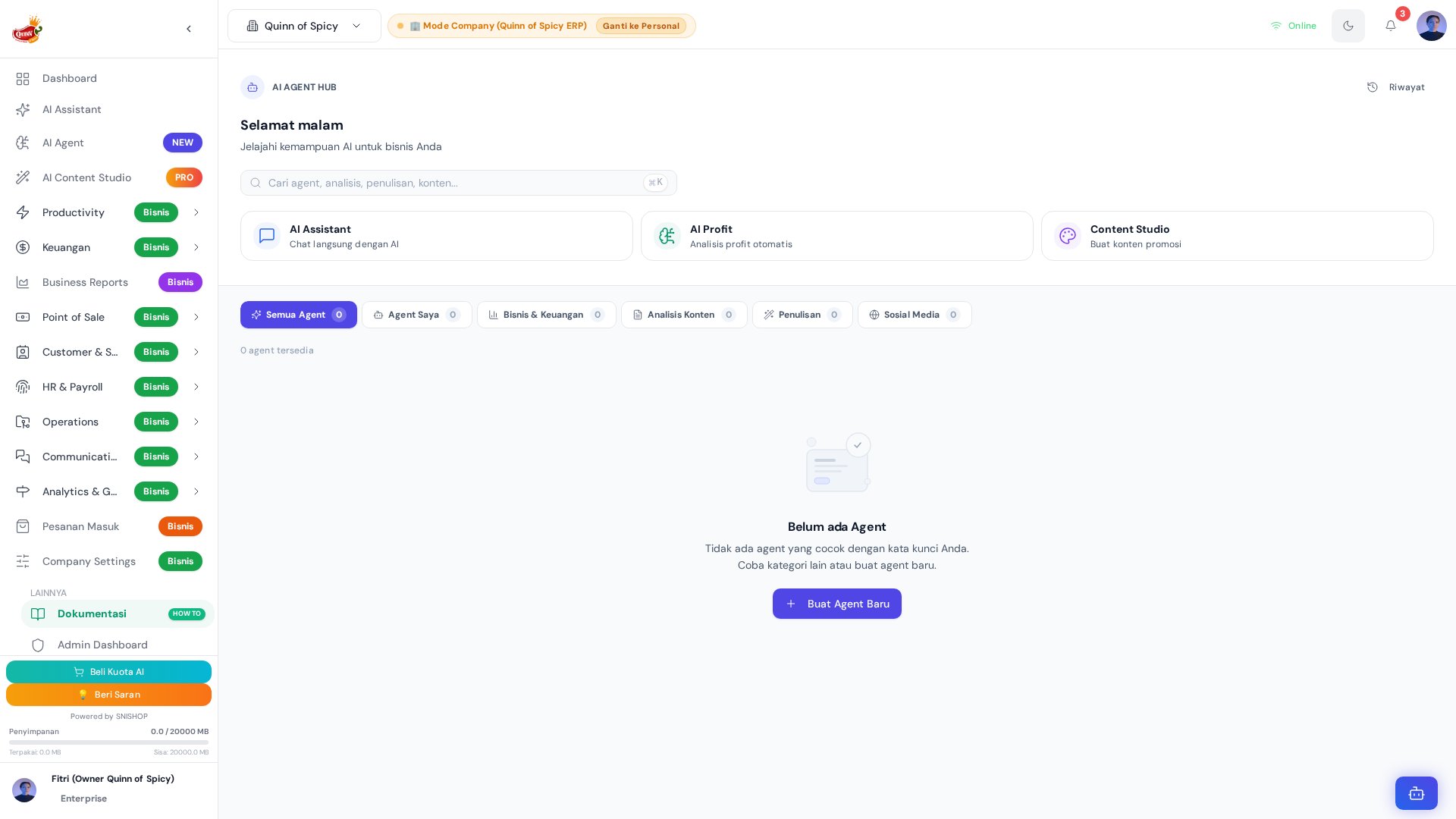 Halaman AI Agent menampilkan daftar semua agen yang terdaftar di sistem. Dari sini Anda bisa melihat status setiap agen, melakukan konfigurasi dasar, memantau performa, dan mengaktifkan atau menonaktifkan agen kapan saja tanpa mengganggu operasional sistem lainnya.
## Gambaran Halaman
```mermaid theme={null}
graph TD
A[AI Agent Page
Halaman AI Agent menampilkan daftar semua agen yang terdaftar di sistem. Dari sini Anda bisa melihat status setiap agen, melakukan konfigurasi dasar, memantau performa, dan mengaktifkan atau menonaktifkan agen kapan saja tanpa mengganggu operasional sistem lainnya.
## Gambaran Halaman
```mermaid theme={null}
graph TD
A[AI Agent Page
AIAgent.jsx — 541 baris] --> B[Header + Search]
A --> C[Category Tabs]
A --> D[Agent Grid]
B --> B1[Cmd/Ctrl+K Search]
B --> B2[Jumlah Agen]
C --> C1[All]
C --> C2[Business]
C --> C3[Writing]
C --> C4[Content]
C --> C5[Social]
C --> C6[Other]
D --> D1[AgentCard ×N]
D1 --> E{Klik}
E --> F[/AIAgentDetail?key={agent_key}]
A --> G[onLoad: runDueAgentSchedules]
```
## Component Hierarchy
```mermaid theme={null}
graph TD
A[AIAgent.jsx
541 baris] --> B[PageHeader]
A --> C[SearchBar
Cmd+K]
A --> D[CategoryTabs]
A --> E[AgentGrid]
A --> F[useEffect
runDueAgentSchedules]
E --> G[AgentCard
91 baris]
G --> G1[Icon]
G --> G2[Name + Tagline]
G --> G3[Category Badge]
G --> G4[Status Badge]
G --> G5[Price Display]
G --> G6[Navigation Link]
```
## AgentCard (91 baris)
Setiap agen ditampilkan sebagai kartu dengan informasi:
| Elemen | Detail |
| - | - |
| **Icon** | Lucide icon sesuai konfigurasi (24 ikon tersedia) |
| **Nama** | Nama agen |
| **Tagline** | Deskripsi singkat satu baris |
| **Kategori** | Badge kategori berwarna |
| **Status** | Aktif (hijau) / Nonaktif (abu) / Coming Soon (kuning) |
| **Harga** | `price_per_run` dalam Rupiah |
| **Link** | Navigasi ke `/AIAgentDetail?key={agent_key}` |
### AgentCard Visual States
```mermaid theme={null}
stateDiagram-v2
[*] --> Normal: Default state
Normal --> Hover: Mouse enter
Hover --> Normal: Mouse leave
Normal --> Loading: Click agent
Loading --> Normal: Navigation complete
Hover --> HoverStyle: Scale 1.02 + shadow
Normal --> NormalStyle: Scale 1.0 + no shadow
```
## Status Agen
| Status | Warna | Deskripsi |
| - | - | - |
| **Active** | Hijau | Agen siap dijalankan |
| **Coming Soon** | Kuning | Agen dalam pengembangan |
| **Inactive** | Abu-abu | Agen dinonaktifkan |
## Kategori
| Kategori | Deskripsi | Contoh Penggunaan |
| - | - | - |
| **Business** | Analisis bisnis dan keuangan | Laporan laba rugi, analisis KPI, health score |
| **Content** | Generate konten produk | Deskripsi produk, marketing copy |
| **Writing** | Penulisan dan editing | Artikel, email, proposal |
| **Social** | Konten media sosial | Post Instagram, TikTok, WhatsApp |
| **Other** | Kegunaan umum | Custom agent untuk berbagai keperluan |
## Toggle Aktif/Nonaktif
Agen custom bisa diaktifkan atau dinonaktifkan kapan saja:
```mermaid theme={null}
stateDiagram-v2
[*] --> Active
Active --> Inactive: Toggle OFF
Inactive --> Active: Toggle ON
Active --> A1[Bisa dijalankan]
Active --> A2[Muncul di grid]
Active --> A3[Scheduled runs aktif]
Inactive --> I1[Tidak bisa dijalankan]
Inactive --> I2[Muncul di grid (abu)]
Inactive --> I3[Scheduled runs pause]
```
### Toggle Impact Analysis
| Aspect | Active | Inactive |
| - | - | - |
| **Execution** | Can be run manually | Cannot be run |
| **Scheduled Runs** | Execute on schedule | Paused |
| **Visibility** | Full card (green badge) | Dimmed card (gray badge) |
| **API Access** | Available | Blocked |
| **Cost** | Incurs cost per run | No cost |
## Pencarian
### Cmd/Ctrl+K Search
Shortcut keyboard untuk pencarian cepat:
| Aspek | Detail |
| - | - |
| Trigger | Tekan `Cmd+K` (Mac) atau `Ctrl+K` (Windows) |
| Scope | Nama agen, tagline, deskripsi |
| Filter | Real-time saat mengetik |
| Navigasi | Arrow keys + Enter untuk memilih |
### Search Algorithm
```mermaid theme={null}
flowchart TD
A[User types query] --> B[Normalize: lowercase + trim]
B --> C{Match against}
C --> D[agent.name]
C --> E[agent.tagline]
C --> F[agent.description]
D & E & F --> G[Filter matching agents]
G --> H[Sort by relevance]
H --> I[Display filtered grid]
```
### Category Filter Tabs
Tab kategori untuk memfilter agen berdasarkan jenis:
```mermaid theme={null}
flowchart LR
A[All] --> B[Tampilkan semua]
C[Business] --> D[Filter category=business]
E[Content] --> F[Filter category=content]
G[Writing] --> H[Filter category=writing]
I[Social] --> J[Filter category=social]
K[Other] --> L[Filter category=other]
```
## Scheduled Execution on Load
Setiap kali halaman dibuka, sistem otomatis menjalankan agen yang jadwalnya sudah jatuh tempo:
```mermaid theme={null}
sequenceDiagram
participant Page as AIAgent.jsx
participant Backend as runDueAgentSchedules
participant DB as AIAgentSchedule
participant LLM as InvokeLLM
participant Run as AIAgentRun
Page->>Page: useEffect onLoad
Page->>Backend: invoke()
Backend->>DB: Filter schedule_daily + due
loop Due agents
Backend->>LLM: Invoke with context
LLM-->>Backend: Output
Backend->>Run: Create record
Backend->>DB: Update last_triggered_at
end
Backend-->>Page: {ran: N}
```
### Schedule Due Date Logic
```mermaid theme={null}
flowchart TD
A[Load all schedules] --> B{trigger_type?}
B -->|schedule_daily| C[last_triggered_at < today]
B -->|schedule_weekly| D[last_triggered_at + 7 days < now]
B -->|schedule_monthly| E[last_triggered_at + 30 days < now]
B -->|event_*| F[Check event condition]
C & D & E & F --> G{Is due?}
G -->|Yes| H[Add to execution queue]
G -->|No| I[Skip]
H --> J[Execute agent]
J --> K[Update last_triggered_at]
```
## Monitoring Performa
Indikator performa yang ditampilkan:
| Metrik | Sumber |
| - | - |
| Status terakhir | `AIAgentRun.status` terbaru |
| Terakhir dijalankan | `AIAgentRun.created_at` terbaru |
| Success rate | Rasio success/total dari `AIAgentRun` |
| Biaya total | Sum `cost_amount` dari `AIAgentRun` |
### Performance Metrics Computation
```mermaid theme={null}
flowchart LR
subgraph "Input"
R[AIAgentRun records
for specific agent]
end
subgraph "Metrics"
R --> M1[LAST status → Last Status]
R --> M2[LAST created_at → Last Run]
R --> M3[COUNT status=success / COUNT * → Success Rate]
R --> M4[SUM cost_amount → Total Cost]
end
subgraph "Display"
M1 --> D1[Status Badge]
M2 --> D2[Relative Time]
M3 --> D3[Percentage]
M4 --> D4[Rupiah Format]
end
```
## Entities Used
| Entity | Role | Key Fields |
| - | - | - |
| **AIAgentTemplate** | Template definitions | `agent_key`, `name`, `category`, `system_prompt`, `price_per_run` |
| **AIAgent** | Custom agent definitions | `agent_key`, `company_id`, `is_active`, `system_prompt` |
| **AIAgentRun** | Execution records | `agent_key`, `status`, `cost_amount`, `created_at` |
| **AIAgentSchedule** | Schedule configurations | `trigger_type`, `last_triggered_at`, `notification_channel` |
| **AIAgentSettings** | Per-user settings | `user_id`, `agent_key`, `preferences` |
## Cara Akses
Dari sidebar, klik menu **AI & Analitik** > **AI Agents**.
## Flow Penggunaan
```mermaid theme={null}
flowchart TD
A[Buka halaman AI Agent] --> B[Lihat daftar agen + status]
B --> C{Cari agen spesifik?}
C -->|Ya| D[Cmd/Ctrl+K search]
C -->|Tidak| E[Filter by category tab]
D --> F[Klik agen → Detail]
E --> F
F --> G[Isi input + pilih model]
G --> H[Klik Jalankan]
H --> I[Review output]
I --> J[Export jika perlu]
```
## Tips
* Mulai dari agen yang menangani tugas paling repetitif untuk dampak terbesar
* Monitor error rate secara rutin untuk memastikan agen berjalan optimal
* Nonaktifkan agen yang tidak digunakan untuk menghemat kredit
* Buat agen custom untuk tugas spesifik yang tidak tercakup agen template
* Gunakan scheduled agents untuk monitoring otomatis tanpa intervensi manual
***
**Related Documentation**:
* [AI Agent Detail](/docs/ai/ai-agent-detail)
* [Agent Dashboard](/docs/ai/agent-dashboard)
* [AI Agent History](/docs/ai/ai-agent-history)
* [AI Overview](/docs/ai/overview)
***
## Entity Relationship Diagram
```mermaid theme={null}
erDiagram
AIAgentTemplate ||--o{ AIAgent : "source_template_key"
AIAgent ||--o{ AIAgentRun : "agent_key"
AIAgent ||--o{ AIAgentSchedule : "agent_id"
AIAgent }o--|| Company : "company_id"
AIAgentRun }o--|| User : "user_id"
AIAgentSchedule }o--|| Company : "company_id"
AIAgentSettings ||--o{ User : "setting_key = global"
AIAgentTemplate {
string agent_key PK
string name
string tagline
string description
string category
string icon
string color
number price_per_run
number credit_cost
array features
array use_cases
array input_fields
string system_prompt
string model
boolean use_internet
string status
number order
}
AIAgent {
string agent_key PK
string company_id FK
string created_by
string name
string tagline
string description
string category
string icon
string color
string system_prompt
array input_fields
string model
boolean use_internet
string status
string source_template_key FK
number run_count
number total_cost_amount
number total_cost_credit
datetime created_date
datetime updated_date
}
AIAgentRun {
string user_id FK
string user_email
string company_id FK
string company_name
string agent_key FK
string agent_name
string model_used
string model_name
object input_data
string output
number cost_amount
number cost_credit
string payment_method
string status
}
AIAgentSchedule {
string agent_id FK
string company_id FK
string trigger_type
object trigger_config
boolean is_active
datetime last_triggered_at
number trigger_count
string notification_channel
string created_by
datetime created_date
}
AIAgentModel {
string model_key PK
string name
string description
number price_multiplier
string tier
boolean supports_internet
boolean is_active
number order
}
AIAgentSettings {
string setting_key PK
string description
number credit_to_rupiah_rate
number base_price_per_run
boolean allow_credit_payment
boolean allow_balance_payment
}
```
## Tabel Schema
### AIAgent — Agen AI Custom (20 field)
| Field | Tipe | Required | Default | Deskripsi |
| - | - | - | - | - |
| `agent_key` | string | **Ya** | — | Kunci unik agent (auto-generated slug dari nama) |
| `company_id` | string | **Ya** | — | ID perusahaan (scope company-level) |
| `created_by` | string | **Ya** | — | Email user yang membuat agent |
| `name` | string | **Ya** | — | Nama AI Agent |
| `tagline` | string | Tidak | — | Deskripsi singkat satu baris |
| `description` | string | Tidak | — | Penjelasan lengkap fungsi agent (max 2000 karakter) |
| `category` | enum | Tidak | `"other"` | Kategori: `business`, `content`, `writing`, `social`, `other` |
| `icon` | string | Tidak | `"Sparkles"` | Nama icon lucide-react |
| `color` | string | Tidak | `"#4F46E5"` | Warna hex agent |
| `system_prompt` | string | **Ya** | — | Instruksi sistem utama untuk LLM (max 4000 karakter) |
| `input_fields` | array\[object] | Tidak | — | Field input dinamis: `{key, label, type, placeholder, required}` |
| `model` | string | Tidak | `"automatic"` | Model LLM default |
| `use_internet` | boolean | Tidak | `false` | Gunakan konteks internet saat menjalankan agent |
| `status` | enum | Tidak | `"active"` | Status agen: `active`, `paused`, `inactive` |
| `source_template_key` | string | Tidak | — | Link ke AIAgentTemplate asal (nullable) |
| `run_count` | number | Tidak | `0` | Total eksekusi agent |
| `total_cost_amount` | number | Tidak | `0` | Total biaya Rupiah semua run |
| `total_cost_credit` | number | Tidak | `0` | Total kredit yang dipakai semua run |
| `created_date` | datetime | Tidak | — | Tanggal agent dibuat |
| `updated_date` | datetime | Tidak | — | Tanggal agent terakhir diperbarui |
### AIAgentRun — Riwayat Eksekusi Agen (14 field)
| Field | Tipe | Required | Default | Deskripsi |
| - | - | - | - | - |
| `user_id` | string | **Ya** | — | ID user yang menjalankan |
| `user_email` | string | Tidak | — | Email user yang menjalankan |
| `company_id` | string | Tidak | — | ID perusahaan aktif (null untuk personal) |
| `company_name` | string | Tidak | — | Nama perusahaan saat agent dijalankan |
| `agent_key` | string | **Ya** | — | Kunci agen yang dijalankan |
| `agent_name` | string | Tidak | — | Nama agen saat dijalankan |
| `model_used` | string | Tidak | — | Model AI yang dipakai pada run ini |
| `model_name` | string | Tidak | — | Nama tampilan model yang dipakai |
| `input_data` | object | Tidak | — | Input yang diberikan user |
| `output` | string | Tidak | — | Hasil dari AI Agent (max 100.000 karakter) |
| `cost_amount` | number | Tidak | `0` | Biaya Rupiah yang dipotong |
| `cost_credit` | number | Tidak | `0` | Kredit yang dipotong |
| `payment_method` | enum | Tidak | `"balance"` | Metode bayar: `balance`, `credit`, `free` |
| `status` | enum | Tidak | `"success"` | Status run: `success`, `failed` |
### AIAgentTemplate — Template Agen Bawaan Sistem (17 field)
| Field | Tipe | Required | Default | Deskripsi |
| - | - | - | - | - |
| `agent_key` | string | **Ya** | — | Kunci unik agent (e.g. `business_analysis`) |
| `name` | string | **Ya** | — | Nama AI Agent |
| `tagline` | string | Tidak | — | Deskripsi singkat satu baris |
| `description` | string | Tidak | — | Penjelasan lengkap fungsi agent (max 2000 karakter) |
| `category` | enum | Tidak | `"other"` | Kategori: `business`, `content`, `writing`, `social`, `other` |
| `icon` | string | Tidak | `"Sparkles"` | Nama icon lucide-react |
| `color` | string | Tidak | `"#3b82f6"` | Warna hex template |
| `price_per_run` | number | Tidak | `5000` | Biaya per penggunaan dalam Rupiah |
| `credit_cost` | number | Tidak | `1` | Biaya alternatif dalam kredit AI |
| `features` | array\[string] | Tidak | — | Daftar fitur utama |
| `use_cases` | array\[string] | Tidak | — | Daftar kasus penggunaan |
| `input_fields` | array\[object] | Tidak | — | Field input yang diminta dari user |
| `system_prompt` | string | Tidak | — | Instruksi sistem untuk LLM (max 4000 karakter) |
| `model` | string | Tidak | `"automatic"` | Model LLM yang dipakai |
| `use_internet` | boolean | Tidak | `false` | Gunakan konteks internet |
| `status` | enum | Tidak | `"active"` | Status template: `active`, `coming_soon`, `inactive` |
| `order` | number | Tidak | `0` | Urutan pengurutan tampilan |
### AIAgentModel — Katalog Model AI (8 field)
| Field | Tipe | Required | Default | Deskripsi |
| - | - | - | - | - |
| `model_key` | string | **Ya** | — | Kunci model untuk InvokeLLM (misal: `automatic`, `gpt_5_mini`, `claude_sonnet_4_6`) |
| `name` | string | **Ya** | — | Nama tampilan model (misal: `Standar (Cepat & Hemat)`) |
| `description` | string | Tidak | — | Penjelasan singkat kualitas/kecepatan model (max 500 karakter) |
| `price_multiplier` | number | Tidak | `1` | Pengali biaya. Biaya akhir = harga dasar agent x multiplier |
| `tier` | enum | Tidak | `"standard"` | Tingkatan: `standard`, `advanced`, `premium` |
| `supports_internet` | boolean | Tidak | `false` | Model mendukung konteks internet |
| `is_active` | boolean | Tidak | `true` | Model aktif tersedia untuk dipilih |
| `order` | number | Tidak | `0` | Urutan pengurutan tampilan |
### AIAgentSettings — Pengaturan Global AI Agent (6 field)
| Field | Tipe | Required | Default | Deskripsi |
| - | - | - | - | - |
| `setting_key` | string | **Ya** | `"global"` | Kunci pengaturan (selalu `global` untuk pengaturan utama) |
| `description` | string | Tidak | — | Catatan pengaturan AI Agent (max 1000 karakter) |
| `credit_to_rupiah_rate` | number | Tidak | `10` | Nilai 1 kredit dalam Rupiah (1 kredit = Rp10) |
| `base_price_per_run` | number | Tidak | `1000` | Harga dasar default per penggunaan (Rupiah) |
| `allow_credit_payment` | boolean | Tidak | `true` | Izinkan user membayar dengan kredit |
| `allow_balance_payment` | boolean | Tidak | `true` | Izinkan user membayar dengan saldo Rupiah |
### AIAgentSchedule — Jadwal & Trigger Agen (10 field)
| Field | Tipe | Required | Default | Deskripsi |
| - | - | - | - | - |
| `agent_id` | string | **Ya** | — | Referensi ke AIAgent (agent\_key) |
| `company_id` | string | **Ya** | — | ID perusahaan |
| `trigger_type` | enum | **Ya** | — | Jenis trigger: `schedule_daily`, `schedule_weekly`, `schedule_monthly`, `event_low_stock`, `event_invoice_overdue`, `event_new_transaction`, `event_task_due`, `event_custom` |
| `trigger_config` | object | Tidak | — | Konfigurasi trigger (schedule: `{hour, minute, day_of_week?}`, event: `{threshold?, days_before?}`) |
| `is_active` | boolean | Tidak | `true` | Apakah schedule/trigger aktif |
| `last_triggered_at` | datetime | Tidak | — | Waktu terakhir trigger fired |
| `trigger_count` | number | Tidak | `0` | Berapa kali trigger sudah fired |
| `notification_channel` | enum | Tidak | `"in_app"` | Channel notifikasi: `in_app`, `whatsapp`, `email`, `all` |
| `created_by` | string | **Ya** | — | Email user yang membuat schedule |
| `created_date` | datetime | Tidak | — | Tanggal schedule dibuat |
## State Machine — Siklus Hidup Agen
```mermaid theme={null}
stateDiagram-v2
[*] --> Active: Agen dibuat (default)
Active --> Paused: User pause / agent error berulang
Active --> Inactive: User nonaktifkan total
Paused --> Active: User resume
Paused --> Inactive: User nonaktifkan total
Inactive --> Active: User aktifkan kembali
Inactive --> Paused: User aktifkan lalu pause
state Active {
[*] --> DapatDijalankan
DapatDijalankan --> ScheduledRunsAktif: Schedule configured
DapatDijalankan --> ManualRun: User klik jalankan
ScheduledRunsAktif --> ManualRun: User override
}
state Paused {
[*] --> HanyaManual
HanyaManual --> BlockedSchedule: Scheduled runs di-skip
}
state Inactive {
[*] --> TidakBisaAkses
TidakBisaAkses --> APIBlocked: Semua API call ditolak
}
```
### Dampak Transisi Status
| Status | Eksekusi Manual | Scheduled Runs | Tampilan UI | Akses API | Biaya |
| - | - | - | - | - | - |
| **Active** | Diperbolehkan | Aktif sesuai jadwal | Badge hijau | Tersedia | Terkena biaya |
| **Paused** | Diperbolehkan | Di-skip | Badge kuning | Terbatas | Terkena biaya |
| **Inactive** | Ditolak | Di-skip | Badge abu-abu | Diblokir | Tidak ada |
## Sequence Diagrams
### Eksekusi Agen Manual
```mermaid theme={null}
sequenceDiagram
participant User
participant UI as AIAgentDetail.jsx
participant API as Base44 API
participant LLM as InvokeLLM
participant DB as AIAgentRun
participant Agent as AIAgent
User->>UI: Isi input + pilih model
UI->>API: invokeAgent(agent_key, input, model)
API->>Agent: Baca system_prompt + input_fields
API->>API: Hitung biaya (price_per_run x model_multiplier)
API->>API: Validasi saldo/kredit user
alt Saldo Cukup
API->>LLM: Kirim prompt + konteks
LLM-->>API: Output AI
alt Berhasil
API->>DB: Insert AIAgentRun (status=success)
API->>Agent: Increment run_count, total_cost
API-->>UI: {output, cost}
UI-->>User: Tampilkan hasil + biaya
else Gagal (LLM Error)
API->>DB: Insert AIAgentRun (status=failed)
API-->>UI: {error, retry_hint}
UI-->>User: Tampilkan error + opsi retry
end
else Saldo Tidak Cukup
API-->>UI: {error: "Saldo tidak cukup"}
UI-->>User: Pesan top-up
end
```
### Scheduled Execution (Otomatis)
```mermaid theme={null}
sequenceDiagram
participant Page as AIAgent.jsx
participant Scheduler as runDueAgentSchedules
participant SchedDB as AIAgentSchedule
participant Agent as AIAgent
participant LLM as InvokeLLM
participant RunDB as AIAgentRun
Page->>Page: useEffect onLoad
Page->>Scheduler: invoke()
Scheduler->>SchedDB: Query WHERE is_active=true AND due
loop Setiap schedule yang jatuh tempo
Scheduler->>Agent: Baca agent config
Agent-->>Scheduler: {system_prompt, input_fields, model}
Scheduler->>LLM: Invoke dengan konteks + data
LLM-->>Scheduler: Output AI
alt Sukses
Scheduler->>RunDB: Insert run (status=success)
Scheduler->>Agent: Update run_count + total_cost
else Gagal
Scheduler->>RunDB: Insert run (status=failed)
end
Scheduler->>SchedDB: Update last_triggered_at, trigger_count
end
Scheduler-->>Page: {ran: N, results: [...]}
```
### Tool Calling & Error Recovery
```mermaid theme={null}
sequenceDiagram
participant User
participant Agent as AI Agent
participant LLM as LLM Provider
participant Tool as External Tool
participant Cache as Response Cache
participant DB as AIAgentRun
User->>Agent: Kirim permintaan
Agent->>LLM: Prompt + system instructions
LLM-->>Agent: Tool call request (function_name, params)
loop Retry hingga 3x
Agent->>Tool: Execute tool call
alt Tool Sukses
Tool-->>Agent: Tool result
Agent->>Cache: Simpan hasil sementara
Agent->>LLM: Lanjutkan dengan tool result
LLM-->>Agent: Final output
else Tool Timeout
Tool-->>Agent: Timeout error
Agent->>Agent: Backoff + retry
else Tool Error
Tool-->>Agent: Error message
Agent->>LLM: Kirim error ke LLM untuk fallback
LLM-->>Agent: Fallback response tanpa tool
end
end
Agent->>DB: Simpan run (output + cost)
Agent-->>User: Tampilkan hasil
```
### Error Recovery Flow
```mermaid theme={null}
flowchart TD
A[Mulai Eksekusi Agent] --> B[Kirim ke LLM]
B --> C{LLM Response?}
C -->|Sukses| D[Parse Output]
C -->|Timeout| E{Sudah retry 3x?}
C -->|Rate Limited| F[Tunggu cooldown]
C -->|Invalid Response| G[Retry dengan prompt sederhana]
E -->|Belum| H[Backoff exponential]
H --> B
E -->|Sudah| I[Simpan run status=failed]
F --> J[Retry request]
J --> B
G --> K{Valid?}
K -->|Ya| D
K -->|Tidak| I
D --> L[Simpan run status=success]
I --> M[Notifikasi user]
L --> N[Tampilkan hasil]
M --> O[Tampilkan error + opsi retry]
```
## Enum Tables
### agent\_status — Status Agen Custom
| Nilai | Label | Deskripsi |
| - | - | - |
| `active` | Aktif | Agent berjalan otomatis dan bisa dijalankan manual |
| `paused` | Dijeda | Scheduled runs di-skip, tapi masih bisa dijalankan manual |
| `inactive` | Nonaktif | Agent tidak bisa dijalankan sama sekali |
### template\_status — Status Template Agen
| Nilai | Label | Deskripsi |
| - | - | - |
| `active` | Aktif | Template tersedia dan bisa dibuat menjadi agent |
| `coming_soon` | Segera Hadir | Template dalam pengembangan, belum bisa digunakan |
| `inactive` | Nonaktif | Template disembunyikan dari daftar |
### agent\_category — Kategori Agen
| Nilai | Label | Deskripsi |
| - | - | - |
| `business` | Bisnis | Analisis bisnis, keuangan, laporan, KPI |
| `content` | Konten | Generate konten produk, marketing copy |
| `writing` | Penulisan | Artikel, email, proposal, editing |
| `social` | Media Sosial | Post Instagram, TikTok, WhatsApp blast |
| `other` | Lainnya | Custom agent untuk berbagai keperluan |
### model\_tier — Tingkatan Model AI
| Nilai | Label | Deskripsi |
| - | - | - |
| `standard` | Standar | Cepat dan hemat, cocok untuk tugas sederhana |
| `advanced` | Lanjutan | Kualitas lebih baik, cocok untuk analisis kompleks |
| `premium` | Premium | Model terbaik, cocok untuk tugas kritis |
### model\_provider — Provider Model (via model\_key)
| Nilai | Contoh model\_key | Deskripsi |
| - | - | - |
| Automatic | `automatic` | Sistem memilih model optimal secara otomatis |
| OpenAI | `gpt_5_mini`, `gpt_5` | Model dari OpenAI |
| Anthropic | `claude_sonnet_4_6`, `claude_opus_4` | Model dari Anthropic |
### run\_status — Status Eksekusi Agen
| Nilai | Label | Deskripsi |
| - | - | - |
| `success` | Berhasil | Agent menghasilkan output valid |
| `failed` | Gagal | Agent gagal menghasilkan output (error/timeout) |
### payment\_method — Metode Pembayaran Run
| Nilai | Label | Deskripsi |
| - | - | - |
| `balance` | Saldo Rupiah | Biaya dipotong dari saldo Rupiah user |
| `credit` | Kredit AI | Biaya dipotong dari kredit AI user |
| `free` | Gratis | Tidak ada biaya (promo atau konfigurasi khusus) |
### trigger\_type — Jenis Trigger Schedule
| Nilai | Kategori | Deskripsi |
| - | - | - |
| `schedule_daily` | Jadwal | Trigger setiap hari |
| `schedule_weekly` | Jadwal | Trigger setiap minggu |
| `schedule_monthly` | Jadwal | Trigger setiap bulan |
| `event_low_stock` | Event | Trigger saat stok produk rendah |
| `event_invoice_overdue` | Event | Trigger saat invoice jatuh tempo |
| `event_new_transaction` | Event | Trigger saat ada transaksi baru |
| `event_task_due` | Event | Trigger saat tugas mendekati deadline |
| `event_custom` | Event | Trigger berdasarkan kondisi custom |
### notification\_channel — Channel Notifikasi
| Nilai | Label | Deskripsi |
| - | - | - |
| `in_app` | Dalam Aplikasi | Notifikasi muncul di dalam aplikasi |
| `whatsapp` | WhatsApp | Notifikasi dikirim via WhatsApp |
| `email` | Email | Notifikasi dikirim via email |
| `all` | Semua Channel | Notifikasi dikirim ke semua channel |
## RBAC — Hak Akses AI Agent
| Role | Lihat Daftar Agen | Lihat Detail Agen | Jalankan Agen | Buat Agent Custom | Edit Agent | Hapus Agent | Kelola Schedule | Lihat Semua Run | Kelola Settings |
| - | - | - | - | - | - | - | - | - | - |
| **Super Admin** | Ya | Ya | Ya | Ya | Ya | Ya | Ya | Ya (semua company) | Ya |
| **Admin** | Ya | Ya | Ya | Ya | Ya | Ya | Ya | Ya (company sendiri) | Ya |
| **Manager** | Ya | Ya | Ya | Ya | Ya (milik sendiri) | Tidak | Ya | Ya (company sendiri) | Tidak |
| **Staff** | Ya | Ya | Ya | Tidak | Tidak | Tidak | Tidak | Ya (milik sendiri) | Tidak |
| **Viewer** | Ya | Ya (read-only) | Tidak | Tidak | Tidak | Tidak | Tidak | Ya (milik sendiri) | Tidak |
### Catatan RBAC
* **Agent Template** bersifat read-only untuk semua role kecuali Super Admin
* **AIAgentSettings** hanya bisa diubah oleh Super Admin dan Admin
* **Biaya run** selalu dibebankan ke company yang menjalankan, bukan individual
* **Scheduled runs** hanya berjalan untuk agen dengan status `active`
* **Data run** antar company terisolasi (multi-tenant)
This documentation is built and hosted on [Mintlify](https://mintlify.com), a developer documentation platform.